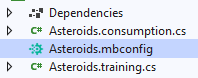
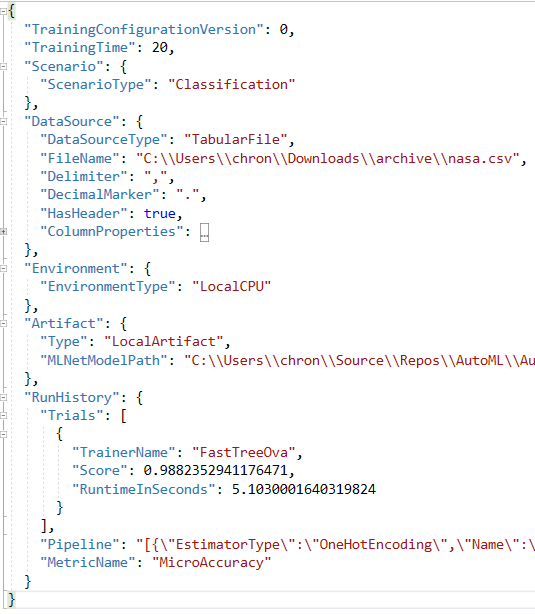
<?xml version="1.0" encoding="utf-8"?><feed xmlns="http://www.w3.org/2005/Atom" ><generator uri="https://jekyllrb.com/" version="3.10.0">Jekyll</generator><link href="/feed.xml" rel="self" type="application/atom+xml" /><link href="/" rel="alternate" type="text/html" /><updated>2026-02-14T18:09:08+00:00</updated><id>/feed.xml</id><title type="html">Your awesome title</title><subtitle>Write an awesome description for your new site here. You can edit this line in _config.yml. It will appear in your document head meta (for Google search results) and in your feed.xml site description.</subtitle><entry><title type="html">What’s New in the ML.NET CLI</title><link href="/mlnet/tools/2023/01/22/whats-new-in-the-mlnet-cli.html" rel="alternate" type="text/html" title="What’s New in the ML.NET CLI" /><published>2023-01-22T00:00:00+00:00</published><updated>2023-01-22T00:00:00+00:00</updated><id>/mlnet/tools/2023/01/22/whats-new-in-the-mlnet-cli</id><content type="html" xml:base="/mlnet/tools/2023/01/22/whats-new-in-the-mlnet-cli.html"><![CDATA[<p>The <a href="http://ML.NET">ML.NET</a> CLI has gotten some interesting updates. This post will go over the main items that are new.</p>

<p>For a video version of this post, check below.</p>

<iframe width="200" height="113" src="https://www.youtube.com/embed/ZApDu_Q_0-8?feature=oembed" frameborder="0" allow="accelerometer; autoplay; clipboard-write; encrypted-media; gyroscope; picture-in-picture; web-share" allowfullscreen="" title="What's New in the ML.NET CLI"></iframe>

<h1 id="new-install-name">New Install Name</h1>

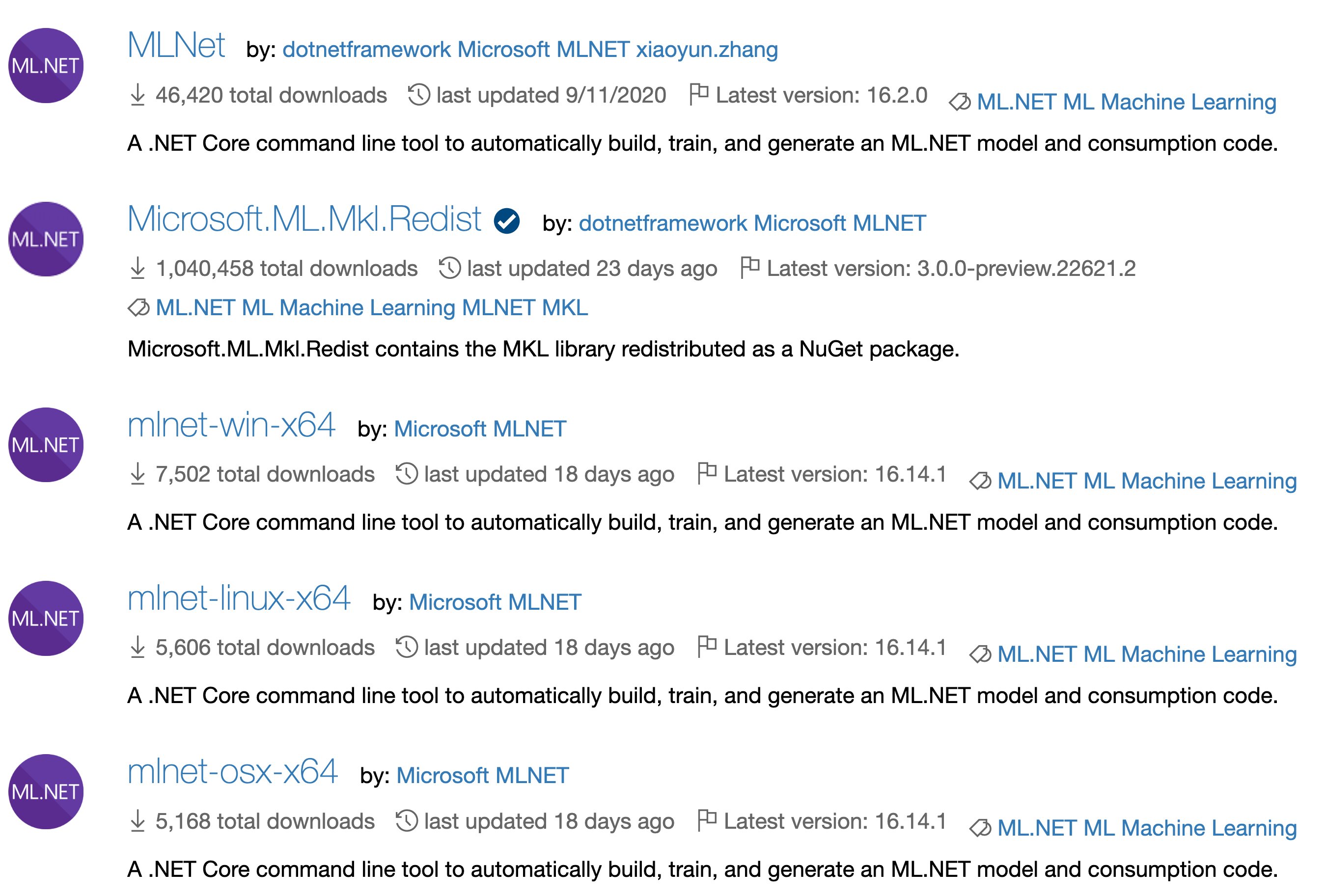
<p>The first thing to make note of is that there is a new name when installing the newer versions of the <a href="http://ML.NET">ML.NET</a> CLI. Since the file size got too big for a single .NET tool, it is now split up into multiple installs depending on what operating system and CPU architecture you’re running.</p>

<p><img src="https://t1253902.p.clickup-attachments.com/t1253902/754024c3-082a-4088-bd67-22e82c56b0dc/image.png" alt="" /></p>

<p>So getting the newest version will require a new install even if you have the older version installed. Actually, I would recommend to go ahead and uninstall the older version of the CLI if you already have it installed. This can be done with the <code class="language-plaintext highlighter-rouge">dotnet tool uninstall mlnet --global</code> command.</p>

<p>So depending on your machine is what you will install. I have a M1 MacBook Pro, so I would install the <code class="language-plaintext highlighter-rouge">mlnet-osx-arm</code> version. If you’re on Windows, you will probably be installing the <code class="language-plaintext highlighter-rouge">mlnet-win-x64</code> version.</p>

<p>If you want to update a previously installed newer version, you can use the <code class="language-plaintext highlighter-rouge">dotnet tool update</code> command.</p>

<h1 id="train-with-a-mbconfig-file">Train with a <code class="language-plaintext highlighter-rouge">mbconfig</code> File</h1>

<p>With the new CLI release, it comes with a couple of new command. The first we’ll go over is the <code class="language-plaintext highlighter-rouge">train</code> command. This takes in a single required argument, which is a <code class="language-plaintext highlighter-rouge">mbconfig</code> file. This will use the information in the <code class="language-plaintext highlighter-rouge">mbconfig</code> file and will perform another training run.</p>

<p>This can be good for a few scenarios, including continuous integration where the <code class="language-plaintext highlighter-rouge">mbconfig</code> file is checked into version control and can be run each day to see if a new model can be discovered.</p>

<h1 id="forecasting">Forecasting</h1>

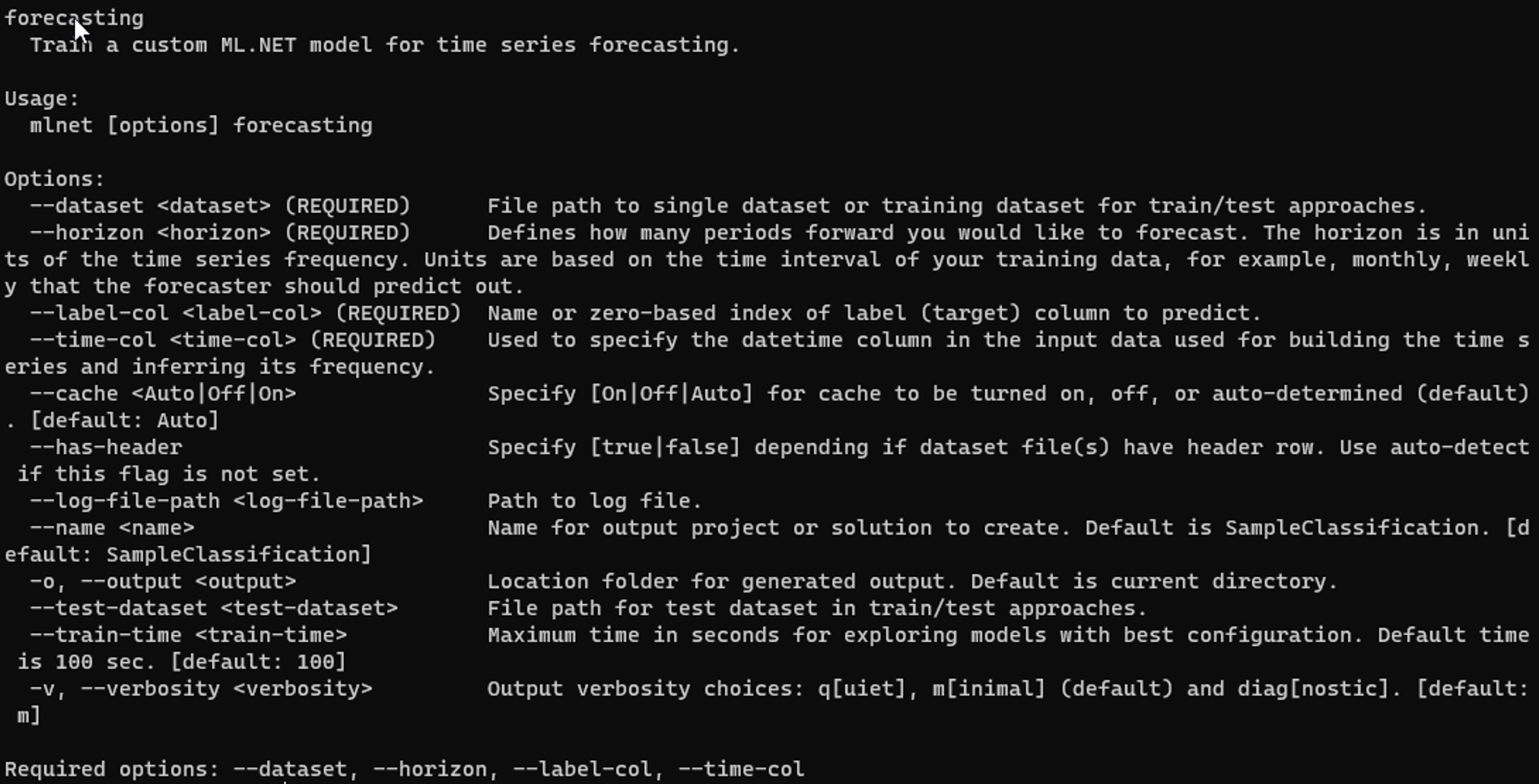
<p>Along with the <code class="language-plaintext highlighter-rouge">train</code> command a new scenario has been added - forecasting. Forecasting is primarily used for time series data to forecast values in the future. Similar to the other scenarios, we have a few arguments we can pass in.</p>

<p><img src="https://t1253902.p.clickup-attachments.com/t1253902/cab9c525-5135-423c-9186-ea6ec313c31d/image.png" alt="" /></p>

<p>The <code class="language-plaintext highlighter-rouge">dataset</code> and <code class="language-plaintext highlighter-rouge">label-col</code> arguments are similar to the other scenarios, but forecasting has a couple of others that are required - <code class="language-plaintext highlighter-rouge">horizon</code> and <code class="language-plaintext highlighter-rouge">time-col</code> .</p>

<p>The <code class="language-plaintext highlighter-rouge">horizon</code> argument is simply the number of items in the future you want the forecasting algorithm to predict.</p>

<p>The <code class="language-plaintext highlighter-rouge">time-col</code> argument is just the column that has the time or dates that the algorithm can use.</p>

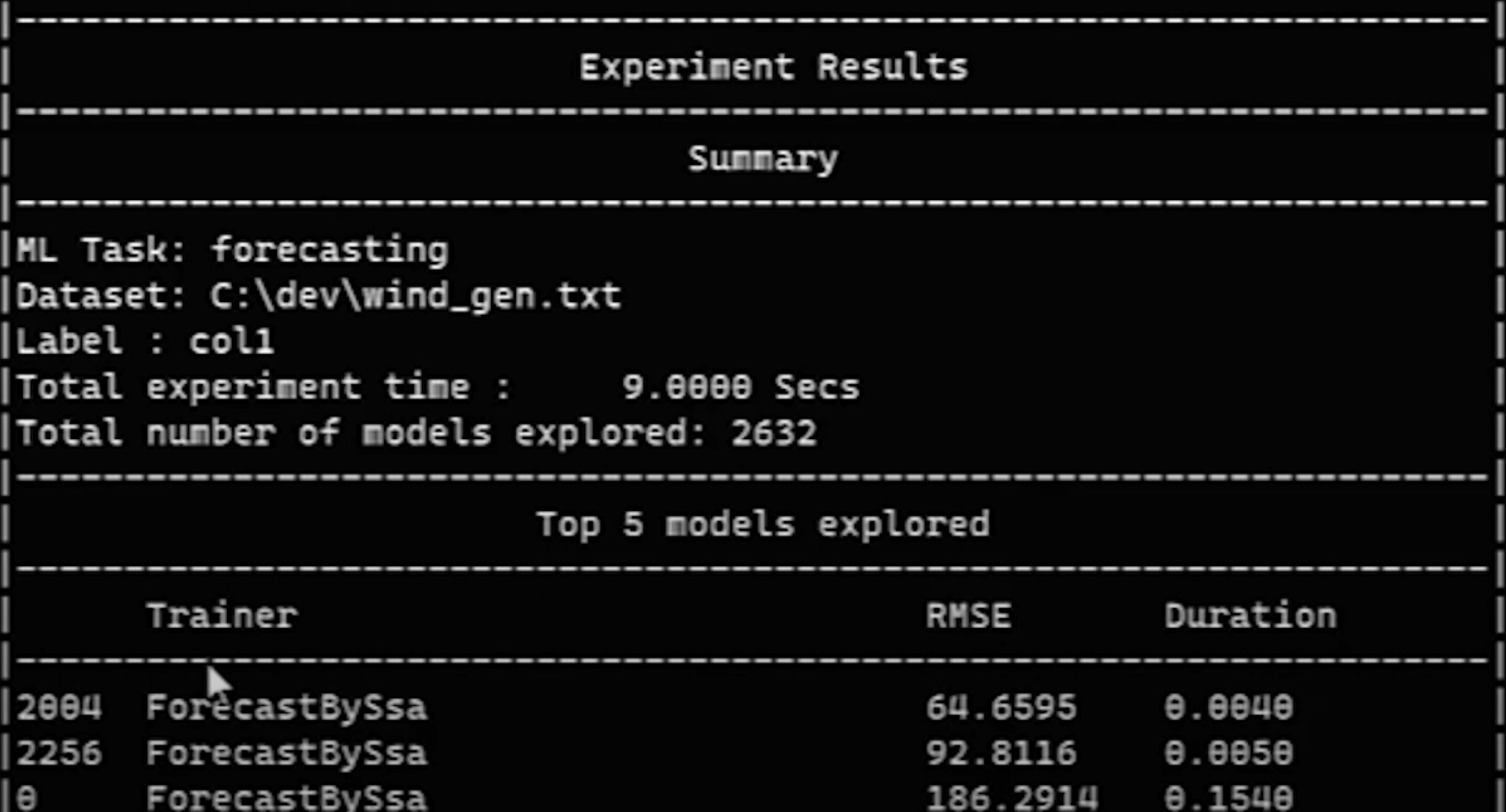
<p>And we can run this like other scenarios with the below command. We’ll let it run only for 10 seconds with the <code class="language-plaintext highlighter-rouge">--train-time</code> argument. The data can be found <a href="https://github.com/rishabh89007/Time_Series_Datasets/blob/main/Wind%20Gen.csv">here</a> if you want to run it as well.</p>

<div class="language-plaintext highlighter-rouge"><div class="highlight"><pre class="highlight"><code>mlnet forecasting --dataset C:/dev/wind_gen.txt --horizon 3 --label-col 1 --time-col 0 --train-time 10
</code></pre></div></div>

<p><img src="https://t1253902.p.clickup-attachments.com/t1253902/34d1edb2-7548-4e7f-84cf-a4e6de01c022/image.png" alt="" /></p>

<hr />

<p>A couple of big additions to the CLI and I’m sure more are coming. It is nice to see that the <a href="http://ML.NET">ML.NET</a> team is continuing to keep the CLI’s features on par with Model Builder.</p>]]></content><author><name></name></author><category term="mlnet" /><category term="tools" /><category term="mlnet-updates" /><category term="mlnet" /><category term="mlnet-cli" /><summary type="html"><![CDATA[The ML.NET CLI has gotten some interesting updates. This post will go over the main items that are new.]]></summary></entry><entry><title type="html">Introduction to QnA Maker</title><link href="/cognitive-services/2022/01/17/introduction-to-qna-maker.html" rel="alternate" type="text/html" title="Introduction to QnA Maker" /><published>2022-01-17T00:00:00+00:00</published><updated>2022-01-17T00:00:00+00:00</updated><id>/cognitive-services/2022/01/17/introduction-to-qna-maker</id><content type="html" xml:base="/cognitive-services/2022/01/17/introduction-to-qna-maker.html"><![CDATA[<p>Suppose you have a FAQ page that has a lot of data and want to use that as a first line of customer service support for a chat bot on your main page. How can you integrate this with minimal effort? Enter Microsoft Q&amp;A Maker.</p>

<p>For the video verison of this post, check below.</p>

<iframe class="embedly-embed" src="//cdn.embedly.com/widgets/media.html?src=https%3A%2F%2Fwww.youtube.com%2Fembed%2FqhAPQEE7Gow%3Ffeature%3Doembed&amp;display_name=YouTube&amp;url=https%3A%2F%2Fwww.youtube.com%2Fwatch%3Fv%3DqhAPQEE7Gow&amp;image=https%3A%2F%2Fi.ytimg.com%2Fvi%2FqhAPQEE7Gow%2Fhqdefault.jpg&amp;key=61d05c9d54e8455ea7a9677c366be814&amp;type=text%2Fhtml&amp;schema=youtube" width="854" height="480" scrolling="no" title="YouTube embed" frameborder="0" allow="autoplay; fullscreen" allowfullscreen="true"></iframe>

<h2 id="what-is-microsoft-qna-maker">What is Microsoft QnA Maker</h2>

<p>From the official <a href="https://docs.microsoft.com/en-us/azure/cognitive-services/QnAMaker/Overview/overview">docs</a> it states that…</p>

<blockquote>
  <p>QnA Maker is a cloud-based Natural Language Processing (NLP) service that allows you to create a natural conversational layer over your data.</p>
</blockquote>

<p>So, basically, this service allows you to creates question and answering based on the data that you have.</p>

<h2 id="creating-the-azure-resource">Creating the Azure Resource</h2>

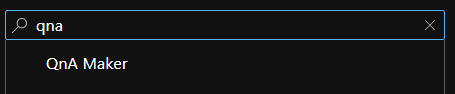
<p>First thing, like for all Cognitive Services items, we need to create the Azure resource. When creating a new resource, you can search for “QnA” and select “QnA Maker”.</p>

<p><img src="https://images.squarespace-cdn.com/content/v1/521545a6e4b0734032a27076/ebe0585c-e14b-4dfe-967c-c3232465cd32/Pasted+image+20211208170245.png?format=original" alt="" /></p>

<p>After clicking “Create” on that, we’re on a screen where we have to enter a few things. First, we will supply the subscription, resource group, name, and pricing tier. Note that this does have a free tier so this can be used for proof of concepts or to simply try out the service to see if it meets your needs.</p>

<p>Next, it will ask for details for Azure Search. This is used to host the data that you give it for the QnA maker and Azure Search is used for that. Only the location and pricing tier is needed for this. This has a free tier, as well.</p>

<p>Last, it will ask details for an App Service. This is used to host the runtime for QnA maker which will be used to make queries against your data. The app name and location is required for this.</p>

<p>You can optionally enable app insights for this service as well, but feel free to disable that since it’s not really needed unless you are creating this for actual business purposes and want to see if anything goes wrong.</p>

<p>With all that, we can click the “Review and Create” button to create and deploy the resources.</p>

<h2 id="creating-a-qna-knowledge-base">Creating a QnA Knowledge Base</h2>

<p>With the resource created we can now go to it. Per usual with the Cognitive Services items, we have a “Keys and Endpoint” item on the left where we can get the key and endpoint. This will be used later when using the API.</p>

<p>But first, we need to create our QnA Knowledge Base and to do that we need to go to the “Overview” tab on the left navigation. A bit down it has a link where we can go to the QnA portal to create a new knowledge base.</p>

<p><img src="https://images.squarespace-cdn.com/content/v1/521545a6e4b0734032a27076/80eb7912-c070-4c2c-a65c-46d6d31b3d3f/Pasted+image+20211208172042.png?format=original" alt="" /></p>

<p>We can skip step one since we already created the Azure resource. In step two, we will connect the QnA portal to our Azure resource. Simply give it the subscription and the Azure service name. Luckily, all of this pre-populates so they are all dropdowns.</p>

<p>In step three, we will give our knowledge base a name. We’ll name it “ikea” since we will use the Ikea FAQ to populate the knowledge base.</p>

<p>Step four is where we’ll populate the knowledge base. If you already have a FAQ on your website you can put the URL in. Since I’m using the <a href="https://www.ikea.com/us/en/customer-service/faq/">Ikea FAQ</a> we can do that. You can also add a file for this. If you have neither, you can leave this blank and fill out the questions and answers manually on the next page.</p>

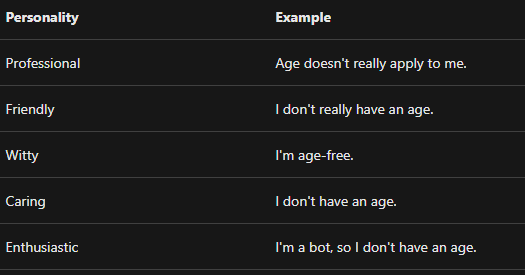
<p>Below this you can customize your bot with a chit-chat. This just helps give your QnA bot a bit more personality based on what you select. Here’s a screenshot of an example from <a href="https://docs.microsoft.com/en-us/azure/cognitive-services/qnamaker/how-to/chit-chat-knowledge-base">the docs</a> of each of the chit-chat items that you can choose from.</p>

<p><img src="https://images.squarespace-cdn.com/content/v1/521545a6e4b0734032a27076/0ead30e5-29d8-474e-abf1-c3e86e978466/Pasted+image+20211211073427.png?format=original" alt="" /></p>

<p>For step five, we can create our knowledge base by clicking on the button.</p>

<h2 id="training-and-testing">Training and Testing</h2>

<p>Once we have our knowledge base created we can look see that it read in the Ikea FAQ quite well. To see just how well QnA Maker is, we can instantly click on the “Save and train” button to train a model on our data.</p>

<p>Once that finishes we can click on the “Test” button to give the model a test. This is an integrated chat bot where we can ask it questions and will receive answers based on the model.</p>

<p>So we can ask “What is the return policy?” and QnA Maker will give us the best answer based on our data.</p>

<p><img src="https://images.squarespace-cdn.com/content/v1/521545a6e4b0734032a27076/59eef268-f07f-4989-a266-fe12bb334009/Pasted+image+20211213175116.png?format=original" alt="" /></p>

<p>Early on we get some good results from QnA Maker. But what if we want to add a new pair?</p>

<h2 id="adding-a-new-qna-pair">Adding a New QnA Pair</h2>

<p>If we want to add new QnA pairs to our existing knowledge base, just click on the <strong>Add QnA Pair</strong> button.</p>

<p><img src="https://images.squarespace-cdn.com/content/v1/521545a6e4b0734032a27076/9573a02d-7358-4902-92e7-a854a1caedff/Pasted+image+20211214121558.png?format=original" alt="" /></p>

<p>We can add an alternate phrasing such as “This is a question”. A phrasing is mostly a question that a user would input into the system that will get sent to QnA Maker. We can input an answer as well, such as “This is an answer”. Notice that we have a rich text editor which can be toggled in the upper left. With this, we can add graphics, links, and emojis. Let’s add a smile emoji to our answer.</p>

<p><img src="https://images.squarespace-cdn.com/content/v1/521545a6e4b0734032a27076/12d53b3f-0af3-4f62-9e0f-b1d58c7b305b/Pasted+image+20211215135503.png?format=original" alt="" /></p>

<p>Now we can click the “Save and train” button to train a new model on what we just added. We can then do another test and in put “This is a question” and we should get the answer that we put as the output.</p>

<p><img src="https://images.squarespace-cdn.com/content/v1/521545a6e4b0734032a27076/7e4c8ab8-f9a3-4933-93cb-0340efee0038/Pasted+image+20211215135614.png?format=original" alt="" /></p>

<h2 id="using-the-api">Using the API</h2>

<p>Before we can actually use the API we need to publish our knowledge base. Simply click the “Publish” tab near the top and then the “Publish” button.</p>

<p><img src="https://images.squarespace-cdn.com/content/v1/521545a6e4b0734032a27076/3c4422f2-841d-489b-b803-f3da8d9c7151/Pasted+image+20211216130209.png?format=original" alt="" /></p>

<p>Once that completes you can either create a bot that will use this knoweldge base, or you can use the API directly. We’ll use the API and the publish page shows how you can call the API using Postman or through curl. We’ll use Postman here so we can easily test the API out.</p>

<p>To build the URL for the API, use the “Host” item in the deployment details and then append the first item where it has “POST” after that.</p>

<p><img src="https://images.squarespace-cdn.com/content/v1/521545a6e4b0734032a27076/b89b2b9b-9675-455f-947b-755035c09eb9/Pasted+image+20211218012805.png?format=original" alt="" /></p>

<p>And since it does say “POST” we will make this as a POST call.</p>

<p><img src="https://images.squarespace-cdn.com/content/v1/521545a6e4b0734032a27076/0f9d72bd-83ba-42b4-a5d0-d439cd1fc342/Pasted+image+20211218012807.png?format=original" alt="" /></p>

<p>Next, we need to set the authorization header. In the Authorization tab in Postman, set the type to “API Key”. The “Key” item will be “Authorization” and the “Value” will be the API key which is the third part of the deployment details.</p>

<p>Now, we can add in the JSON body and the simplest JSON that we can add has only one item, a “question” item. And this is the prompt that a user would send to QnA Maker. Let’s add the question that we added earlier.</p>

<div class="language-plaintext highlighter-rouge"><div class="highlight"><pre class="highlight"><code>{
 "question":"This is a question"
}
</code></pre></div></div>

<p>Once we hit “Send” in Postman, we will get the below response.</p>

<div class="language-plaintext highlighter-rouge"><div class="highlight"><pre class="highlight"><code>{
     "answers": [
     {
         "questions": [
             "This is a question"
         ],
         "answer": "This is an answer😀",
         "score": 100.0,
         "id": 176,
         "source": "Editorial",
         "isDocumentText": false,
         "metadata": [],
         "context": {
             "isContextOnly": false,
             "prompts": []
         }

    }
 ],
 "activeLearningEnabled": false
}
</code></pre></div></div>

<p>The main part to notice here is the “answer”, which is what we expect to get back.</p>

<hr />

<p>Hopefully, this showed how useful the QnA Maker can be, especially if you already have a FAQ page with questions and answers. With QnA Maker it can be turned into a chat bot or any other automation tool where users or customers may need to ask questions.</p>]]></content><author><name></name></author><category term="cognitive-services" /><category term="cognitive-services" /><category term="qna-maker" /><summary type="html"><![CDATA[Suppose you have a FAQ page that has a lot of data and want to use that as a first line of customer service support for a chat bot on your main page. How can you integrate this with minimal effort? Enter Microsoft Q&amp;A Maker.]]></summary></entry><entry><title type="html">Use Bing Image Search to Get Training Image Data</title><link href="/cognitive-services/2021/12/06/use-bing-image-search-to-get-training-image-data6.html" rel="alternate" type="text/html" title="Use Bing Image Search to Get Training Image Data" /><published>2021-12-06T00:00:00+00:00</published><updated>2021-12-06T00:00:00+00:00</updated><id>/cognitive-services/2021/12/06/use-bing-image-search-to-get-training-image-data6</id><content type="html" xml:base="/cognitive-services/2021/12/06/use-bing-image-search-to-get-training-image-data6.html"><![CDATA[<p>When going through the FastAI book, <a href="https://amzn.to/3FIWUsw">Deep Learning for Coders</a>, I noticed that in one of the early chapters they mention using the <a href="https://docs.microsoft.com/en-us/bing/search-apis/bing-image-search/overview">Bing Image Search API</a> to retrieve images for training data. While they have a nice wrapper for the API, I thought I’d dive into the API as well and use it to build my own way to download training image data.</p>

<p>Let’s suppose we need to make an image classification model to determine what kind of car is in an image. We’d need quite a bit of different images for this model, so let’s use the Bing Image Search to gather images of the Aston-Martin car so we can start getting our data.</p>

<p>Check out the below for a video version of this post.</p>

<iframe class="embedly-embed" src="//cdn.embedly.com/widgets/media.html?src=https%3A%2F%2Fwww.youtube.com%2Fembed%2FlKCxQ6mxuy0%3Ffeature%3Doembed&amp;display_name=YouTube&amp;url=https%3A%2F%2Fwww.youtube.com%2Fwatch%3Fv%3DlKCxQ6mxuy0&amp;image=https%3A%2F%2Fi.ytimg.com%2Fvi%2FlKCxQ6mxuy0%2Fhqdefault.jpg&amp;key=61d05c9d54e8455ea7a9677c366be814&amp;type=text%2Fhtml&amp;schema=youtube" width="854" height="480" scrolling="no" title="YouTube embed" frameborder="0" allow="autoplay; fullscreen" allowfullscreen="true"></iframe>

<h2 id="why-bing-image-search">Why Bing Image Search</h2>

<p>Before going into the technical side of Bing Image Search, let’s go over why use this in the first place. Why not just download the images ourselves?</p>

<p>Bing Images Search has a few features in it that we can utilize in our code when getting our images. Some of these features are important to take into account.</p>

<h3 id="automation">Automation</h3>

<p>I’ll be honest, I’m lazy and if I can script something to do a task for me then I’ll definitely spend the time to build the script rather than do the task manually. Rather than manually finding images and downloading them, we can use the Bing Image Search API to do this for us.</p>

<h3 id="image-license">Image License</h3>

<p>We can’t always just take an image from a website and use it however we want. A lot of images that are online are copyrighted and if we don’t have a license to use the copyright we are actually in violation of the creator’s copyright. If they find out we use their image without a license or permission then they can, more than likely, take legal action against us.</p>

<p>However, with Bing Image Search, we have an option to specify what license the images has that get returned to us. We can do this with the <code class="language-plaintext highlighter-rouge">licenseType</code> query parameter in our API call. This utilizes <a href="https://creativecommons.org/">Creative Commons</a> licenses. We can specify exactly what type of license our images has. We can specify that want images that are public where the copyright is fully waived, which is what we will do. There are many Creative Commons license types that the Bing Image Search supports and there’s a full list <a href="https://docs.microsoft.com/en-us/bing/search-apis/bing-image-search/reference/query-parameters#license">here</a>.</p>

<h3 id="image-type">Image Type</h3>

<p>There are quite a few images types that we could download from Bing Image Search. For our purposes, though, we only want photos of Aston Martin cars. Due to that, we can specify the image type in our API calls to just <code class="language-plaintext highlighter-rouge">photo</code>. If we don’t specify this we could get back animated GIFs, clip art, or drawings of Aston Martin cars.</p>

<h3 id="safe-content">Safe Content</h3>

<p>When downloading images from the internet you never really know what you’re going to get. Bing Image Search can help ease that worry by specifying that you want only safe content to be returned.</p>

<p>Bing can do this filtering for us so we don’t have to worry about it when we do our API call. This is one less thing we have to worry about and, because it’s the internet, it’s definitely something to worry about when download images.</p>

<h2 id="create-azure-resource">Create Azure Resource</h2>

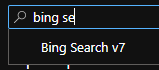
<p>Before we can use the Bing Image Search API we need to create the resource for it. In the Azure Portal create a new resource and search for “Bing Search”. Then, click on the “Bing Search v7” resource to create it.</p>

<p><img src="https://images.squarespace-cdn.com/content/v1/521545a6e4b0734032a27076/88d0d438-613b-48a0-bdae-79183fdea0fb/Pasted+image+20211127081402.png?format=original" alt="" /></p>

<p>When creating the resource give it a name, what resource group it will be under, and what subscription it will be under. For the pricing tier, it does have a free tier to allow you to give the service a try for evaluation or for a proof of concept. Once that is complete, click “Create”.</p>

<p>When that completes deployment, we can explore a bit on the resource page. One thing to note is that there are a few things we can look at here. There’s a “Try me” tab where we can try the Bing Search API and see what results we get. There is some sample code to see real quick how to use the Bing Search API. And there are a lot of tutorials that we can look at if we want to look at something more specific, such as the image or video search APIs.</p>

<p><img src="https://images.squarespace-cdn.com/content/v1/521545a6e4b0734032a27076/992b1ab5-e64b-4e5c-a392-0c1b4705b4a8/Pasted+image+20211127083005.png?format=original" alt="" /></p>

<h2 id="retrieve-key-and-endpoint">Retrieve Key and Endpoint</h2>

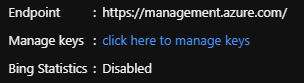
<p>To use the API in our code we will need the API key and the endpoint to call. There are a couple of ways we can get to it. First, on the “Overview” page of the resource there’s a link that says to “click here to manage keys”. Clicking that will take you to another page where you can get the API keys and the endpoint URL.</p>

<p><img src="https://images.squarespace-cdn.com/content/v1/521545a6e4b0734032a27076/6f75c579-89c9-4226-92ec-c0e4b98cd2d6/Pasted+image+20211128053009.png?format=original" alt="" /></p>

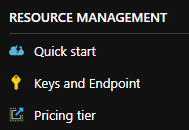
<p>You can also click on the “Keys and Endpoint” section on the left navigation.</p>

<p><img src="https://images.squarespace-cdn.com/content/v1/521545a6e4b0734032a27076/0b347e5f-60a2-4054-a7f9-ae5c67729e67/Pasted+image+20211128052911.png?format=original" alt="" /></p>

<p>Now save the API key and the endpoint since we’ll need those to access the API in the code.</p>

<h2 id="using-the-api">Using the API</h2>

<p>Now we get to the fun stuff where we can get into some code. I’ll be using Python, but you’re very welcome to use the language of your choice since this is a simple API call. I’m also using Azure ML since it’s very easy to get a Jupyter Lab instance running plus most machine learning and data science packages already installed.</p>

<h3 id="imports">Imports</h3>

<p>First, we need to import some modules. We have four that we will need to import.</p>

<ul>
  <li><strong>JSON</strong>: This will be used to read in a config file for the API key and endpoint</li>
  <li><strong>Requests</strong>: Will be used to make the API calls. This is pre-installed in an Azure ML Jupyter instance, so you may need to run <code class="language-plaintext highlighter-rouge">pip install requests</code> if you are using another envrionment.</li>
  <li><strong>Time</strong>: Used to delay API calls so the server doesn’t get hit too much by requests.</li>
  <li><strong>OS</strong>: Used to saved and help clean image data on the local machine.</li>
  <li><strong>PPrint</strong>: Used to format JSON when printing.</li>
</ul>

<div class="language-plaintext highlighter-rouge"><div class="highlight"><pre class="highlight"><code>import json
import requests
import time
import os
import pprint
</code></pre></div></div>

<h3 id="the-api-call">The API Call</h3>

<p>Now, we can start building and making the API call to get the image data.</p>

<h4 id="building-the-endpoint">Building the Endpoint</h4>

<p>To start building the call, we need to get the API key which is kept in a JSON file for security reasons. We’ll use the <code class="language-plaintext highlighter-rouge">open</code> method to open the file to be able to read it and use the <code class="language-plaintext highlighter-rouge">json</code> module to load the JSON file. This creates a dictionary where the JSON keys are the key names of the dictionary where you can get the values.</p>

<div class="language-plaintext highlighter-rouge"><div class="highlight"><pre class="highlight"><code>config = json.load(open("config.json"))

api_key = config["apiKey"]
</code></pre></div></div>

<p>Now that we have the API key we can build up the URL to make the API call. We can use the endpoint that we got from the Azure Portal and help build up the URL.</p>

<div class="language-plaintext highlighter-rouge"><div class="highlight"><pre class="highlight"><code>endpoint = "https://api.bing.microsoft.com/"
</code></pre></div></div>

<p>With the endpoint, we have to add some to it to tell it that we want the Image Search API. To learn more about the exact endpoints we’re using here, <a href="https://docs.microsoft.com/en-us/bing/search-apis/bing-image-search/reference/endpoints">this doc</a> has a lot of good information.</p>

<div class="language-plaintext highlighter-rouge"><div class="highlight"><pre class="highlight"><code>url = f"{endpoint}v7.0/images/search"
</code></pre></div></div>

<h4 id="building-the-headers-and-query-parameters">Building the Headers and Query Parameters</h4>

<p>Some more information we need to add to our call are the headers and the query parameters. The headers is where we supply the API key and the query parameters detail what images we want to return.</p>

<p>Requests makes it easy to specify the headers, which is done as a dictionary. We need to supply the <code class="language-plaintext highlighter-rouge">Ocp-Apim-Subscription-Key</code> header for the API key.</p>

<div class="language-plaintext highlighter-rouge"><div class="highlight"><pre class="highlight"><code>headers = { "Ocp-Apim-Subscription-Key": api_key }
</code></pre></div></div>

<p>The query parameters are also done as a dictionary. We’ll supply the license, image type, and safe search parameters here. Those are optional parameters, but the <code class="language-plaintext highlighter-rouge">q</code> parameter is required which is what query we want to use to search for images. For our query here, we’ll search for aston martin cars.</p>

<div class="language-plaintext highlighter-rouge"><div class="highlight"><pre class="highlight"><code>params = {
    "q": "aston martin", 
    "license": "public", 
    "imageType": "photo",
    "safeSearch": "Strict",
}
</code></pre></div></div>

<h4 id="making-the-api-call">Making the API Call</h4>

<p>With everything ready, we can now make the API call and get the results. With <code class="language-plaintext highlighter-rouge">requests</code> we can just call the <code class="language-plaintext highlighter-rouge">get</code> method. In there we pass in the URl, the headers, and the parameters. We use the <code class="language-plaintext highlighter-rouge">raise_for_status</code> method to throw an exception if the status code isn’t successful. Then, we get the JSON of the response and store that into a variable. Finally, we use the pretty print method to print the JSON response.</p>

<div class="language-plaintext highlighter-rouge"><div class="highlight"><pre class="highlight"><code>response = requests.get(url, headers=headers, params=params)
response.raise_for_status()

result = response.json()

pprint.pprint(result)
</code></pre></div></div>

<p>And here’s a snapshot of the response. There’s quite a bit here but we’ll break it down some later in this post.</p>

<div class="language-plaintext highlighter-rouge"><div class="highlight"><pre class="highlight"><code>{'_type': 'Images',
 'currentOffset': 0,
 'instrumentation': {'_type': 'ResponseInstrumentation'},
 'nextOffset': 38,
 'totalEstimatedMatches': 475,
 'value': [{'accentColor': 'C6A105',
            'contentSize': '1204783 B',
            'contentUrl': '[https://www.publicdomainpictures.net/pictures/380000/velka/aston-martin-car-1609287727yik.jpg](https://www.publicdomainpictures.net/pictures/380000/velka/aston-martin-car-1609287727yik.jpg)',
            'creativeCommons': 'PublicNoRightsReserved',
            'datePublished': '2021-02-06T20:45:00.0000000Z',
            'encodingFormat': 'jpeg',
            'height': 1530,
            'hostPageDiscoveredDate': '2021-01-12T00:00:00.0000000Z',
            'hostPageDisplayUrl': '[https://www.publicdomainpictures.net/view-image.php?image=376994&amp;amp;picture=aston-martin-car](https://www.publicdomainpictures.net/view-image.php?image=376994&amp;amp;picture=aston-martin-car)',
            'hostPageFavIconUrl': '[https://www.bing.com/th?id=ODF.lPqrhQa5EO7xJHf8DMqrJw&amp;amp;pid=Api](https://www.bing.com/th?id=ODF.lPqrhQa5EO7xJHf8DMqrJw&amp;amp;pid=Api)',
            'hostPageUrl': '[https://www.publicdomainpictures.net/view-image.php?image=376994&amp;amp;picture=aston-martin-car](https://www.publicdomainpictures.net/view-image.php?image=376994&amp;amp;picture=aston-martin-car)',
            'imageId': '38DBFEF37523B232A6733D7D9109A21FCAB41582',
            'imageInsightsToken': 'ccid_WTqn9r3a*cp_74D633ADFCF41C86F407DFFCF0DEC38F*mid_38DBFEF37523B232A6733D7D9109A21FCAB41582*simid_608053462467504486*thid_OIP.WTqn9r3aKv5TLZxszieEuQHaF5',
            'insightsMetadata': {'availableSizesCount': 1,
                                 'pagesIncludingCount': 1},
            'isFamilyFriendly': True,
            'name': 'Aston Martin Car Free Stock Photo - Public Domain '
                    'Pictures',
            'thumbnail': {'height': 377, 'width': 474},
            'thumbnailUrl': '[https://tse2.mm.bing.net/th?id=OIP.WTqn9r3aKv5TLZxszieEuQHaF5&amp;amp;pid=Api](https://tse2.mm.bing.net/th?id=OIP.WTqn9r3aKv5TLZxszieEuQHaF5&amp;amp;pid=Api)',
            'webSearchUrl': '[https://www.bing.com/images/search?view=detailv2&amp;amp;FORM=OIIRPO&amp;amp;q=aston+martin&amp;amp;id=38DBFEF37523B232A6733D7D9109A21FCAB41582&amp;amp;simid=608053462467504486](https://www.bing.com/images/search?view=detailv2&amp;amp;FORM=OIIRPO&amp;amp;q=aston+martin&amp;amp;id=38DBFEF37523B232A6733D7D9109A21FCAB41582&amp;amp;simid=608053462467504486)',
            'width': 1920}]
</code></pre></div></div>

<p>A few things to note from the response:</p>

<ul>
  <li><code class="language-plaintext highlighter-rouge">nextOffset</code>: This will help us page items to perform multiple requests.</li>
  <li><code class="language-plaintext highlighter-rouge">value.contentUrl</code>: This is the actual URL of the image. We will use this URL to download the images.</li>
</ul>

<h3 id="paging-through-results">Paging Through Results</h3>

<p>For a single API call we may get around 30 items or so by default. How do we get more images with the API? We page through the results. And the way to do this is to use the <code class="language-plaintext highlighter-rouge">nextOffset</code> item in the API response. We can use this value to pass in another query parameter <code class="language-plaintext highlighter-rouge">offset</code> to give the next page of results.</p>

<p>So if I only want at most 200 images, I can use the below code to page through the API results.</p>

<div class="language-plaintext highlighter-rouge"><div class="highlight"><pre class="highlight"><code>new_offset = 0

while new_offset &lt;= 200:
    print(new_offset)
    params["offset"] = new_offset

    response = requests.get(url, headers=headers, params=params)
    response.raise_for_status()

    result = response.json()

    time.sleep(1)

    new_offset = result["nextOffset"]

    for item in result["value"]:
        contentUrls.append(item["contentUrl"])
</code></pre></div></div>

<p>We initialize the offset to 0 so the initial call will give the first page of results. In the <code class="language-plaintext highlighter-rouge">while</code> loop we limit to just 200 images for the offset. Within the loop we set the <code class="language-plaintext highlighter-rouge">offset</code> parameter to the current offset, which will be 0 initially. Then we make the API call, we sleep or wait for one second, and we set the <code class="language-plaintext highlighter-rouge">offset</code> parameter to the <code class="language-plaintext highlighter-rouge">nextOffset</code> from the results and save the <code class="language-plaintext highlighter-rouge">contentUrl</code> items from the results into a list. Then, we do it again until we reach the limit of our offset.</p>

<h3 id="downloading-the-images">Downloading the Images</h3>

<p>In the previous API calls all we did was capture the <code class="language-plaintext highlighter-rouge">contentUrl</code> items from each of the images. In order to get the images as training data we need to download them. Before we do that, let’s set up our paths to be ready for images to be downloaded to them. First we set the path and then we use the <code class="language-plaintext highlighter-rouge">os</code> module to check if the path exists. If it doesn’t, we’ll create it.</p>

<div class="language-plaintext highlighter-rouge"><div class="highlight"><pre class="highlight"><code>dir_path = "./aston-martin/train/"

if not os.path.exists(dir_path):
    os.makedirs(dir_path)
</code></pre></div></div>

<p>Generally, we could just do the below code and loop through all of the content URL items and for each one we create the path with the <code class="language-plaintext highlighter-rouge">os.path.join</code> method to get the correct path for the system we’re on, and open the path with the <code class="language-plaintext highlighter-rouge">open</code> method. With that we can use <code class="language-plaintext highlighter-rouge">requests</code> again with the <code class="language-plaintext highlighter-rouge">get</code> method and pass in the URL. Then, with the <code class="language-plaintext highlighter-rouge">open</code> function, we can write to the path from the image contents.</p>

<div class="language-plaintext highlighter-rouge"><div class="highlight"><pre class="highlight"><code>for url in contentUrls:
    path = os.path.join(dir_path, url)

    try:
        with open(path, "wb") as f:
            image_data = requests.get(url)

            f.write(image_data.content)
    except OSError:
        pass
</code></pre></div></div>

<p>However, this is a bit more complicated than we would hope it would be.</p>

<h3 id="cleaning-the-image-data">Cleaning the Image Data</h3>

<p>If we print the image URLs for all that we get back it would look something like this:</p>

<div class="language-plaintext highlighter-rouge"><div class="highlight"><pre class="highlight"><code>https://www.publicdomainpictures.net/pictures/380000/velka/aston-martin-car-1609287727yik.jpg
https://images.pexels.com/photos/592253/pexels-photo-592253.jpeg?auto=compress&amp;amp;cs=tinysrgb&amp;amp;h=750&amp;amp;w=1260
https://images.pexels.com/photos/2811239/pexels-photo-2811239.jpeg?cs=srgb&amp;amp;dl=pexels-tadas-lisauskas-2811239.jpg&amp;amp;fm=jpg
https://get.pxhere.com/photo/car-vehicle-classic-car-sports-car-vintage-car-coupe-antique-car-land-vehicle-automotive-design-austin-healey-3000-aston-martin-db2-austin-healey-100-69398.jpg
https://get.pxhere.com/photo/car-automobile-vehicle-automotive-sports-car-supercar-luxury-expensive-coupe-v8-martin-vantage-aston-land-vehicle-automotive-design-luxury-vehicle-performance-car-aston-martin-dbs-aston-martin-db9-aston-martin-virage-aston-martin-v8-aston-martin-dbs-v12-aston-martin-vantage-aston-martin-v8-vantage-2005-aston-martin-rapide-865679.jpg
https://c.pxhere.com/photos/5d/f2/car_desert_ferrari_lamborghini-1277324.jpg!d
</code></pre></div></div>

<p>Do you notice anything in the URLs? While most of then end in <code class="language-plaintext highlighter-rouge">jpeg</code> there are a few with some extra parameters on the end. If we try to download with those URLs we won’t get the image. So we need to do a little bit of data cleaning here.</p>

<p>Luckily, there are two patterns we can check, if there is a <code class="language-plaintext highlighter-rouge">?</code> in the URL and if there is a <code class="language-plaintext highlighter-rouge">!</code> in the URL. With those patterns we can update our loop to download the images to the below to get the correct URLs for all images.</p>

<div class="language-plaintext highlighter-rouge"><div class="highlight"><pre class="highlight"><code>for url in contentUrls:
    split = url.split("/")

    last_item = split[-1]

    second_split = last_item.split("?")

    if len(second_split) &gt; 1:
        last_item = second_split[0]

    third_split = last_item.split("!")

    if len(third_split) &gt; 1:
        last_item = third_split[0]

    print(last_item)
    path = os.path.join(dir_path, last_item)

    try:
        with open(path, "wb") as f:
            image_data = requests.get(url)
            #image_data.raise_for_status()

            f.write(image_data.content)
    except OSError:
        pass
</code></pre></div></div>

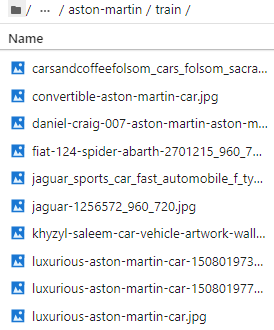
<p>With this cleaning of the URLs we can get the full images.</p>

<p><img src="https://images.squarespace-cdn.com/content/v1/521545a6e4b0734032a27076/4a3cd388-977b-4aaa-9670-1cfe7d366417/Pasted+image+20211129131529.png?format=original" alt="" /></p>

<h3 id="conclusion">Conclusion</h3>

<p>While this probably isn’t as sophisticated as the wrapper that FastAI has, this should help if you need to get training images from Bing Image Search manually. You can also tweak this if needed.</p>

<p>Using Bing Image Search is a great way to get quality and license appropriate images for training data.</p>]]></content><author><name></name></author><category term="cognitive-services" /><category term="bing-image-search" /><category term="cognitive-services" /><summary type="html"><![CDATA[When going through the FastAI book, Deep Learning for Coders, I noticed that in one of the early chapters they mention using the Bing Image Search API to retrieve images for training data. While they have a nice wrapper for the API, I thought I’d dive into the API as well and use it to build my own way to download training image data.]]></summary></entry><entry><title type="html">The ML.NET Deep Learning Plans</title><link href="/mlnet/2021/09/13/the-mlnet-deep-learning-plans.html" rel="alternate" type="text/html" title="The ML.NET Deep Learning Plans" /><published>2021-09-13T00:00:00+00:00</published><updated>2021-09-13T00:00:00+00:00</updated><id>/mlnet/2021/09/13/the-mlnet-deep-learning-plans</id><content type="html" xml:base="/mlnet/2021/09/13/the-mlnet-deep-learning-plans.html"><![CDATA[<p>One of the most requested features for ML.NET is the ability to create neural networks models from scratch to perform deep learning in ML.NET. The ML.NET team has taken that feedback and the feedback from the <a href="https://devblogs.microsoft.com/dotnet/ml-net-june-updates-model-builder/#ml-net-survey-results">customer survey</a> and has come out with a plan to start implementing this feature.</p>

<h2 id="current-state-of-deep-learning-in-mlnet">Current State of Deep Learning in ML.NET</h2>

<p>Currently, in ML.NET, there isn’t a way to create neural networks to have deep learning models from scratch. There is great support for taking an existing deep learning model and using it for predictions, however. If you have a TensorFlow or ONNX model then those can be used in ML.NET to make predictions.</p>

<p>There is also great support for transfer learning in ML.NET. This allows you to take your own data and train it against a pretrained model to give you a model of your own.</p>

<p>However, as mentioned earlier, ML.NET does not yet have the capability to let you create your own deep learning models from scratch. Let’s take a look at what the plans are for this.</p>

<h2 id="future-deep-learning-plans">Future Deep Learning Plans</h2>

<p>In the ML.NET GitHub repo there is an <a href="https://github.com/dotnet/machinelearning/issues/5918">issue</a> that was fairly recently created that goes over the plans to implement creating deep learning models in ML.NET.</p>

<p>There are two reasons for this:</p>

<ol>
  <li>Communicate to the community about what the plans are and that this is being worked on.</li>
  <li>Get feedback from the community on the current plan.</li>
</ol>

<p>While we’ll touch on the main points in the issue in this post, I would highly encourage you to go through it and give any feedback or questions about the plans you may have to help the ML.NET team in their planning or implementation.</p>

<p>The issue details three parts in order to deliver creating deep learning models in ML.NET:</p>

<ol>
  <li>Make consuming of ONNX models easier</li>
  <li>Support TorchSharp and make it production ready</li>
  <li>Create an API in ML.NET to support TorchSharp</li>
</ol>

<p>Let’s go into each of these in more detail.</p>

<h3 id="easier-use-of-onnx-models">Easier Use of ONNX Models</h3>

<p>While you can currently use ONNX models in ML.NET right now, you do have to know the input and output names in order to use it. Right now we rely on the <a href="https://netron.app/">Netron</a> application to load the ONNX models to give us the input and output names. While this isn’t bad, the team wants to expose an internal way to get these instead of having to rely on a separate application.</p>

<p>Of course, along with the new way to get the input and output names for ONNX models, the documentation will definitely be updated to reflect this. I believe, not only documentation, but examples would follow to show how to do this.</p>

<h3 id="supporting-torchsharp">Supporting TorchSharp</h3>

<p><a href="https://github.com/dotnet/TorchSharp">TorchSharp</a> is the heart of how ML.NET will implement deep learning. Similar to how <a href="https://github.com/SciSharp/TensorFlow.NET">Tensorfow.NET</a> supports scoring TensorFlow models in ML.NET, this will provide access to the PyTorch library in Python. <a href="https://pytorch.org/">PyTorch</a> is starting to lead the way in building deep learning models in research and in industry so it makes sense to implmement in ML.NET.</p>

<p>In fact, one of the popular libraries to build deep learning models is <a href="https://course.fast.ai/">FastAI</a>. Not only is FastAI one of the best courses to take when learning deep learning, but the Python library is one of the best in terms of building deep learning models. Under the hood, though, FastAI uses PyTorch to actually build the models that it produces. This isn’t by accident. The FastAI developers decided that PyTorch was the way to go for this.</p>

<p>TensorFlow is great to support for predicting existing models, but for building new ones from scratch I really think PyTorch and TorchSharp is the preferred way. To do this, TorchSharp will help ML.NET lead the way.</p>

<h3 id="implementing-torchsharp-into-mlnet">Implementing TorchSharp into ML.NET</h3>

<p>The final stage is, once TorchShap has been made production ready, create a high-level API in ML.NET to train deep learning models from scratch.</p>

<p>This will be like when Keras came along for TensorFlow. It was an API on top of TensorFlow to help make building the models much easier. I believe ML.NET can do that for TorchSharp.</p>

<p>This will probably be a big undertaking but definitely worth doing. This will be the API people will use to build their models so taking the time to get this the best way possible. will be worth it in the long run to let us build our models the most trivial way possible which will make us more productive in the long run.</p>

<h2 id="conclusion">Conclusion</h2>

<p>Creating deep learning models from scratch is, by far, one of the most requested features for ML.NET and their plan to do this is definitely going to reach this goal. In fact, I think it will surpass this goal since it will use PyTorch on the backend which is where research and the industry is leaning towards.</p>

<p>If you have any feedback or questions, definitely feel free to comment on the <a href="https://github.com/dotnet/machinelearning/issues/5918">GitHub issue</a>.</p>]]></content><author><name></name></author><category term="mlnet" /><category term="deep-learning" /><category term="mlnet" /><summary type="html"><![CDATA[One of the most requested features for ML.NET is the ability to create neural networks models from scratch to perform deep learning in ML.NET. The ML.NET team has taken that feedback and the feedback from the customer survey and has come out with a plan to start implementing this feature.]]></summary></entry><entry><title type="html">AI Ethics and Fairness Resources</title><link href="/artificial-intelligence/2021/08/25/ai-ethics-and-fairness-resources8.html" rel="alternate" type="text/html" title="AI Ethics and Fairness Resources" /><published>2021-08-25T00:00:00+00:00</published><updated>2021-08-25T00:00:00+00:00</updated><id>/artificial-intelligence/2021/08/25/ai-ethics-and-fairness-resources8</id><content type="html" xml:base="/artificial-intelligence/2021/08/25/ai-ethics-and-fairness-resources8.html"><![CDATA[<p>AI and data ethics and fairness is becoming a very hot topic lately. With computer vision models not being able to see everyone equally to the debacle at Google’s AI division, it’s something that we all need to look out for when doing any type of work with data.</p>

<p>With that, I’d like to show some resources I found that has been useful when researching this topic. Some are videos that go over how bias can get into data and others are actual research papers that go over how to help mitigate bias.</p>

<p>For a video version of this post, check below:</p>

<h1 id="videos">Videos</h1>

<p>There are quite a lot of videos that go over AI ethics. Below are a few of my favorites that have a good amount of information in them.</p>

<ul>
  <li>
    <p><a href="https://www.youtube.com/watch?v=fMym_BKWQzk">The Trouble with Bias</a> by Kate Crawford - This talk, given at the Neural Neural Information Processing Systems (NIPS) in 2017. Not only does Kate goes over what exactly is bias in machine learning models, but she also goes over the harms that it can cause.</p>
  </li>
  <li>
    <p><a href="https://www.youtube.com/watch?v=ZtN6Qx4KddY">Machine Learning and Fairness</a> by Hanna Wallach and Jennifer Wortman Vaughan - This is actually one of my favorite resources on the list. This video goes into several aspects of fairness in machine learning including types of bias that can be in your data as well as ways to help mitigate it such as the Datasheets for Data paper that’s linked in the papers section.</p>
  </li>
  <li>
    <p><a href="https://www.youtube.com/watch?v=I-TSjiXGfSI">Transparency and Intelligibility Throughout the Machine Learning Life Cycle</a> by Jennifer Wortman Vaughan - This goes through the entire machine learning life cycle to best incorporate transparency throughout the life cycle.</p>
  </li>
</ul>

<h1 id="courses">Courses</h1>

<p>There are a couple of courses that go over AI ethics and I believe more will be on the way as time goes on.</p>

<ul>
  <li><a href="https://ethics.fast.ai/">FastAI Ethics</a> - FastAI’s ethics course is probably one of the most comprehensive out there. It has several lectures and each lecture has supplemental materials such as articles and even research papers.</li>
</ul>

<h1 id="books">Books</h1>

<p>Just like courses are coming to teach people about AI ethics, books are also coming to do the same and also to help how you can prevent bias from creeping into your models.</p>

<ul>
  <li><a href="https://www.manning.com/books/interpretable-ai">Interpretable AI</a> by Ajay Thampi - One of the first books I’ve seen on this subject, this book helps you understand why the need for having models that are interpretable and shows how to do it.</li>
</ul>

<h1 id="papers-and-documents">Papers and Documents</h1>

<p>A lot of the information in the other categories come from earlier research done on data bias and AI ethics. As a result of the research some documents have also come out of it to help people creating models to mitigate the amount of bias in their data.</p>

<ul>
  <li>
    <p><a href="https://www.microsoft.com/en-us/research/publication/manipulating-and-measuring-model-interpretability/">Manipulating and Measuring Model Interpretability</a> - This paper goes into how to measure model interpretability. It also helps answer the question about what is interpretability in terms of a machine learning model.</p>
  </li>
  <li>
    <p><a href="https://arxiv.org/pdf/1803.09010.pdf">Datasheets for Datasets</a> - In electronics, there is a datasheet accompanied by each component that describes its characteristics, any testing done on it, etc. This paper proposes the idea of having the same for machine learning data.</p>
  </li>
  <li>
    <p><a href="https://www.microsoft.com/en-us/research/project/ai-fairness-checklist/">AI Fairness Checklist</a> - This document has a checklist that one can follow throughout the lifecycle of creating a model to lookout for fairness.</p>
  </li>
</ul>

<h1 id="tools">Tools</h1>

<p>Thankfully, there are some tools out there that can help us interpret how models are making their predictions as well as assessing fairness within the models.</p>

<ul>
  <li>
    <p><a href="https://fairlearn.org/">Microsoft Fairlearn</a> - This Python tool helps access the fairness in your data. There is a <a href="https://www.youtube.com/watch?v=Ts6tB2p97ek">demo</a> available for this that helps show how it works.</p>
  </li>
  <li>
    <p><a href="https://interpret.ml/">Microsoft InterpretML</a> - Another Python tool to help interpret machine learning models. This one also has a <a href="https://www.youtube.com/watch?v=WwBeKMQ0-I8">demo</a> available.</p>
  </li>
</ul>

<p>Hopefully, this list gave you a good idea about data and AI ethics and fairness. There are definitely many more resources out there and I have been partial to Microsoft for their research and resources.</p>

<p>There will be more posts on ethics and fairness in the future, as well. Especially covering the two tools from Microsoft, Fairlearn and InterpretML.</p>]]></content><author><name></name></author><category term="artificial-intelligence" /><category term="ai" /><category term="ethics" /><summary type="html"><![CDATA[AI and data ethics and fairness is becoming a very hot topic lately. With computer vision models not being able to see everyone equally to the debacle at Google’s AI division, it’s something that we all need to look out for when doing any type of work with data.]]></summary></entry><entry><title type="html">What’s New in ML.NET Version 1.6</title><link href="/mlnet/2021/07/16/whats-new-in-mlnet-version-16.html" rel="alternate" type="text/html" title="What’s New in ML.NET Version 1.6" /><published>2021-07-16T00:00:00+00:00</published><updated>2021-07-16T00:00:00+00:00</updated><id>/mlnet/2021/07/16/whats-new-in-mlnet-version-16</id><content type="html" xml:base="/mlnet/2021/07/16/whats-new-in-mlnet-version-16.html"><![CDATA[<p>Another new release of <a href="http://ML.NET">ML.NET</a> is now out! The <a href="https://github.com/dotnet/machinelearning/blob/main/docs/release-notes/1.6.0/release-1.6.0.md">release notes</a> for version 1.6 has all the details, but this post will highlight all of the more interesting updates from this version. I’ll also include the pull request for each item in case you want to see more details on it or learn how something was implemented.</p>

<p>There were a lot of things added to this release, but they did make a note that there are no breaking changes from everything that was added.</p>

<p>For the video version of this post, check below.</p>

<iframe class="embedly-embed" src="//cdn.embedly.com/widgets/media.html?src=https%3A%2F%2Fwww.youtube.com%2Fembed%2FUJqEYGcwNhU%3Ffeature%3Doembed&amp;display_name=YouTube&amp;url=https%3A%2F%2Fwww.youtube.com%2Fwatch%3Fv%3DUJqEYGcwNhU&amp;image=https%3A%2F%2Fi.ytimg.com%2Fvi%2FUJqEYGcwNhU%2Fhqdefault.jpg&amp;key=61d05c9d54e8455ea7a9677c366be814&amp;type=text%2Fhtml&amp;schema=youtube" width="854" height="480" scrolling="no" title="YouTube embed" frameborder="0" allow="autoplay; fullscreen" allowfullscreen="true"></iframe>

<h2 id="support-for-arm">Support for ARM</h2>

<p>Perhaps the most exciting part of this update is the new <a href="https://github.com/dotnet/machinelearning/pull/5789">support for ARM architectures</a>. This will allow for most training and inference in <a href="http://ML.NET">ML.NET</a>.</p>

<p>Why is this update useful? Well, ARM architectures are almost everywhere. As mentioned in the <a href="https://devblogs.microsoft.com/dotnet/ml-net-june-updates-model-builder/#ml-net-on-arm">June update blog post</a> this ARM architectures are included on mobile and embedded devices. This can open up a whole world of opportunities for ML.NET for mobile phones and IoT devices.</p>

<h2 id="dataframe-updates">DataFrame Updates</h2>

<p>The <a href="https://www.nuget.org/packages/Microsoft.Data.Analysis/">DataFrame API</a> is probably one of the more exciting packages that’s currently in the early stages. Why? Well, .NET doesn’t have much in terms of competing with pandas in Python for data analysis or data wrangling to handle some preprocessing that you may need before you send the data into <a href="http://ML.NET">ML.NET</a> to make a model.</p>

<p>Why am I including DataFrame updates in a <a href="http://ML.NET">ML.NET</a> update? Well, the DataFrame API has been <a href="https://github.com/dotnet/machinelearning/pull/5641">m</a><a href="https://github.com/dotnet/machinelearning/pull/5641">oved into the ML.NET repository</a>! The code used to be in the <a href="https://github.com/dotnet/corefxlab">CoreFx Lab repository</a> as an experimental package, but now it’s no longer experimental and now part of <a href="http://ML.NET">ML.NET</a>. This is great news since it is planned to have many more updates to this API.</p>

<p>Other DataFrame updates include:</p>

<ul>
  <li><a href="https://github.com/dotnet/machinelearning/pull/5821">GroupBy operation extended</a> - While the DataFrame API already had a GroupBy operation, this update adds new property groupings and makes it act more like LINQ’s GroupBy operation.</li>
  <li><a href="https://github.com/dotnet/machinelearning/pull/5711">Improved CSV parsing</a> - Implemented the <code class="language-plaintext highlighter-rouge">TextFieldParser</code> that can be used when loading a CSV file. This allows the handling of quotes in columns.</li>
  <li><a href="https://github.com/dotnet/machinelearning/pull/5712">Convert</a><a href="https://github.com/dotnet/machinelearning/pull/5712"><code class="language-plaintext highlighter-rouge">IDataView</code></a><a href="https://github.com/dotnet/machinelearning/pull/5712">to</a><a href="https://github.com/dotnet/machinelearning/pull/5712"><code class="language-plaintext highlighter-rouge">DataFrame</code></a> - We’ve already had a way to convert a <code class="language-plaintext highlighter-rouge">DataFrame</code> object into an <code class="language-plaintext highlighter-rouge">IDataView</code> to be able to use data loaded with the DataFrame API into <a href="http://ML.NET">ML.NET</a>, but now we can do the opposite where we can load data in <a href="http://ML.NET">ML.NET</a> and convert it into a DataFrame object to perform further analysis on it.</li>
  <li><a href="https://github.com/dotnet/machinelearning/pull/5834">Improved DateTime parsing</a> - This allows for better parsing of date time data.</li>
  <li>Improvements to the <a href="https://github.com/dotnet/machinelearning/pull/5776">Sort</a> and <a href="https://github.com/dotnet/machinelearning/pull/5778">Merge</a> methods - These updates allow for better handling of null fields when performing a sort or merge.</li>
</ul>

<p>By the way, if you’re looking for a way to help contribute to the <a href="http://ML.NET">ML.NET</a> repository, helping with the DataFrame API is a great way to get involved. They have quite a few issues already that you can take a look at and help out with. It would be awesome if we got this package on par with pandas to help make C# a great ecosystem to perform data analysis.</p>

<p>You can use the <a href="https://github.com/dotnet/machinelearning/issues?q=is%3Aopen+is%3Aissue+label%3AMicrosoft.Data.Analysis">Microsoft.Data.Analysis label</a> on the issues to filter them out so you can see what all they need help with.</p>

<h2 id="code-enhancements">Code Enhancements</h2>

<p>Quite a few of the enhancement updates were code quality updates. In fact, <a href="https://github.com/feiyun0112">feiyun0112</a> did several pull requests that improved the code quality of the repo helping to make it easier for folks to read and maintain it.</p>

<h2 id="miscellaneous-updates">Miscellaneous Updates</h2>

<p>There were also quite a lot of updates that didn’t really tie in to a single theme. Here are some of the more interesting ones.</p>

<ul>
  <li><a href="https://github.com/dotnet/machinelearning/pull/5797">Saving Tensorflow models in the SavedModel format</a> - Allows you to save Tensorflow models to use the <a href="https://www.tensorflow.org/guide/saved_model">SavedModel format</a> instead of freezing the graph to save it.</li>
  <li><a href="https://github.com/dotnet/machinelearning/pull/5782">Ability to specify a temp path</a> - You can now specify the temp path location instead of it always going to the default location. This is specified in the <code class="language-plaintext highlighter-rouge">MLContext</code>.</li>
  <li><a href="https://github.com/dotnet/machinelearning/pull/5851">Update LightGBM to version 2.3.1</a> - Using this new version can give better results when using the LightGBM algorithms.</li>
  <li><a href="https://github.com/dotnet/machinelearning/pull/5624">Label column name suggestions in AutoML</a> - If you may have mistyped the label column name when using the AutoML API, this update will give suggestions for fixing it.</li>
  <li>Fixed <a href="https://github.com/dotnet/machinelearning/blob/main/docs/release-notes/1.6.0/release-1.6.0.md#build--test-updates">several CI issues</a> - Some tests would sometimes fail in the CI builds so these updates fixed their stability so that you can have more confidence in your pull request.</li>
  <li><a href="https://github.com/dotnet/machinelearning/pull/5811">Updated doc for cross compiling on ARM</a> - Adds a docker image that can be used.</li>
  <li><a href="https://github.com/dotnet/machinelearning/pull/5815">Updated contribution doc with help wanted tags</a> - Helps direct anyone looking to contribute on where they can find issues.</li>
</ul>

<p>These are just a few of the changes in this release. Version 1.6 has a lot of stuff in it so I encourage you to go through the <a href="https://github.com/dotnet/machinelearning/blob/main/docs/release-notes/1.6.0/release-1.6.0.md">full release notes</a> to see all the items that I didn’t include in this post.</p>

<hr />

<p>What was your favorite update in this release? Was it ARM support or the new DataFrame enhancements? Let me know in the comments!</p>]]></content><author><name></name></author><category term="mlnet" /><category term="mlnet" /><category term="mlnet-updates" /><summary type="html"><![CDATA[Another new release of ML.NET is now out! The release notes for version 1.6 has all the details, but this post will highlight all of the more interesting updates from this version. I’ll also include the pull request for each item in case you want to see more details on it or learn how something was implemented.]]></summary></entry><entry><title type="html">How the Machine Learning Process is Like Cooking</title><link href="/machine-learning/2021/05/17/how-the-machine-learning-process-is-like-cooking.html" rel="alternate" type="text/html" title="How the Machine Learning Process is Like Cooking" /><published>2021-05-17T00:00:00+00:00</published><updated>2021-05-17T00:00:00+00:00</updated><id>/machine-learning/2021/05/17/how-the-machine-learning-process-is-like-cooking</id><content type="html" xml:base="/machine-learning/2021/05/17/how-the-machine-learning-process-is-like-cooking.html"><![CDATA[<p>When creating machine learning models it’s important to follow the machine learning process in order to get the best performing model that you can into production and to keep it performing well.</p>

<p>But why cooking? First, I enjoy cooking. But also, it is something we all do. Now, we all don’t make five course meals every day or aim to be a Michelin star chef. We do follow a process to make our food, though, even if it may be to just heat it up in the microwave.</p>

<p>In this post, I’ll go over the machine learning process and how it relates to cooking to give a better understanding of the process and maybe even a way to help remember the steps.</p>

<p>For the video version, check below:</p>

<iframe class="embedly-embed" src="//cdn.embedly.com/widgets/media.html?src=https%3A%2F%2Fwww.youtube.com%2Fembed%2FHqrkbxd69lM&amp;display_name=YouTube&amp;url=https%3A%2F%2Fwww.youtube.com%2Fwatch%3Fv%3DHqrkbxd69lM&amp;image=https%3A%2F%2Fi.ytimg.com%2Fvi%2FHqrkbxd69lM%2Fhqdefault.jpg&amp;key=61d05c9d54e8455ea7a9677c366be814&amp;type=text%2Fhtml&amp;schema=youtube" width="854" height="480" scrolling="no" title="YouTube embed" frameborder="0" allow="autoplay; fullscreen" allowfullscreen="true"></iframe>

<h1 id="machine-learning-process">Machine Learning Process</h1>

<p>First, let’s briefly go over the machine learning process. Here’s a diagram that’s known as the cross-industry standard process for data mining, or simply known as <a href="https://en.wikipedia.org/wiki/Cross-industry_standard_process_for_data_mining">CRISP-DM</a>.</p>

<p>[caption id=”” align=”alignnone” width=”721”]<img src="https://images.squarespace-cdn.com/content/v1/521545a6e4b0734032a27076/1620565377528-SWZ6ZD07Y4D5U4P5CIU2/CRISPDM.png?format=original" alt=" Kenneth Jensen - Own work based on: ftp://public.dhe.ibm.com/software/analytics/spss/documentation/modeler/18.0/en/ModelerCRISPDM.pdf  (Figure 1) " /> Kenneth Jensen - Own work based on: ftp://public.dhe.ibm.com/software/analytics/spss/documentation/modeler/18.0/en/ModelerCRISPDM.pdf (Figure 1) [/caption]</p>
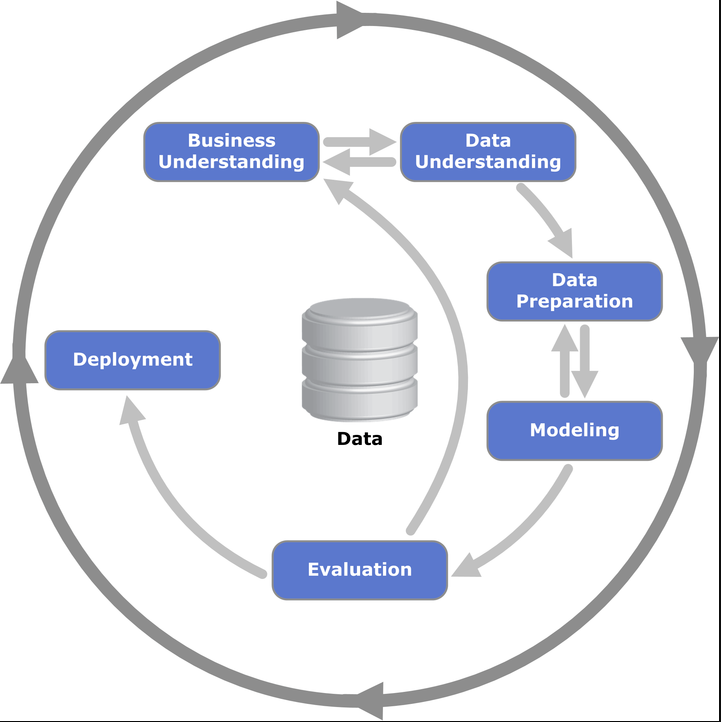
<p>The machine learning process is pretty straight forward when going through the diagram:</p>

<ul>
  <li>
    <p>Business understanding - What exactly is the problem we are trying to solve with data</p>
  </li>
  <li>
    <p>Data understanding - What exactly is in our data, such as what does each column mean and how does it relate to the business problem</p>
  </li>
  <li>
    <p>Data prep - Data preprocessing and preparation. This can also include feature engineering</p>
  </li>
  <li>
    <p>Modeling - Getting a model from our data</p>
  </li>
  <li>
    <p>Evaluation - Evaluating the model for performance on generalized data</p>
  </li>
  <li>
    <p>Deployment - Deploying the model for production use</p>
  </li>
</ul>

<p>Note that a couple of items can go back and forth. You may do multiple iterations of getting a better understanding of the business problem and the data, data prep and modeling, and even going back to the business problem when evaluating a model.</p>

<p>Notice that there’s a circle around the whole process which means you may even have to go back to understanding the problem once a model is deployed.</p>

<p>There are a couple of items I would add to help improve this process, though. First, we need to think about getting our data. Also, I believe can add a separate item in the process for improving our model.</p>

<h2 id="getting-data">Getting Data</h2>

<p>I would actually add an item before or after defining the business problem, and that’s getting data. Sometimes you may have the data already and define the business problem but you may have to get the data after defining the problem. Either way, we need good data. You may have heard an old saying in programming, “Garbage in, garbage out”, and that applies to machine learning as well.</p>

<p>We can’t have a good model unless we give it good data.</p>

<h2 id="improving-the-model">Improving the Model</h2>

<p>Once we have an algorithm we can also spend some time to improve it even further. We can deploy some techniques that can tweak the algorithm to perform better.</p>

<p>Now that we understand the machine learning process a bit better, let’s see how it relates to cooking.</p>

<h1 id="relating-the-machine-learning-process-to-cooking">Relating the Machine Learning Process to Cooking</h1>

<p>At first glance, you may not see how the machine learning process relates to cooking at all. But let’s go into more detail of the machine learning process and how each step relates to cooking.</p>

<h2 id="business-understanding">Business Understanding</h2>

<p>One of the first things to do for the machine learning process is to get a business understanding of the problem.</p>

<p>For cooking, we know we want to make a dish, but which one? What do we want to accomplish with our dish? Is it for breakfast, lunch, or dinner? Is it for just us or do we want to create something for a family of four?</p>

<p>Knowing these will help us determine what we want to cook.</p>

<h2 id="getting-data-1">Getting Data</h2>

<p>I would actually add an item before or after defining the business problem, and that’s getting data. Sometimes you may have the data already and define the business problem but you may have to get the data after defining the problem. Either way, we need good data. You may have heard an old saying in programming, “Garbage in, garbage out”, and that applies to machine learning as well.</p>

<p>We can’t have a good model unless we give it good data.</p>

<h2 id="data-processing">Data Processing</h2>

<p>Data processing is perhaps the most important step after getting good data. Depending on how you process the data will depend on how well your model performs.</p>

<p>For cooking, this is equivalent to preparing your ingredients. This includes chopping any ingredients such as vegetables, but keeping a consistent size when chopping also counts. This helps the pieces cook evenly. If some pieces are smaller they can burn or if some pieces are bigger then they may not be fully cooked.</p>

<p>Also, just like in machine learning there are multiple ways to process your data, there are also different ways to prepare ingredients. In fact, there’s a word for processing all of your ingredients before you start cooking - <a href="https://en.wikipedia.org/wiki/Mise_en_place">mise en place</a> - which is French for “everything in it’s place”. This is done in cooking shows all the time where they have everything ready to start cooking.</p>

<p>This actually also makes sense for machine learning. We have to have all of our data processing done on the training data before we can give it to the machine learning algorithm.</p>

<h2 id="modeling">Modeling</h2>

<p>Now it’s time for the actual modeling part of the process where we give our data to an algorithm.</p>

<p>In cooking, this is actually where we cook our dish. In fact, we can relate choosing a recipe to choosing a machine learning algorithm. The recipe will take the ingredients and turn out a dish, and the algorithm will take the data and turn out a model.</p>

<p>Different recipes will turn out different dishes, though. Take a salad, for instance. Depending on the recipe and the ingredients, the salad can turn out to be bright and citrusy like this <a href="https://www.foodnetwork.com/recipes/ree-drummond/kale-citrus-salad-2593844">kale citrus salad</a>. Or, it can be warm and savory like this <a href="https://www.foodnetwork.com/recipes/alton-brown/spinach-salad-with-warm-bacon-dressing-recipe-1947599">spinach salad with bacon dressing</a>.</p>

<p>They’re both salads, but they are turned into different kinds of salads because of different ingredients and recipes. In machine learning, you can have similar models from different data and algorithms.</p>

<p>What if you have the same ingredients? There are definitely different ways to make the same recipe. Hummus is traditionally made with chickpeas, tahini, garlic, and lemon like in <a href="https://www.foodnetwork.com/recipes/katie-lee/classic-hummus-2333947">this recipe</a>. But there is also <a href="https://www.foodnetwork.com/recipes/alton-brown/hummus-for-real-recipe-2014722">this hummus recipe</a> that has the same ingredients but the recipe is just a bit different.</p>

<h2 id="optimizing-the-model">Optimizing the Model</h2>

<p>Depending on the algorithm the machine learning model is using we can give it different parameters that can optimize the model for better performance. These parameter are called <a href="https://en.wikipedia.org/wiki/Hyperparameter_\(machine_learning\)">hyperparameters</a>, which is used during the learning process of the model to your data.</p>

<p>These can be updated manually by you choosing values for the hyperparameters. This can be quite tedious and you never know what value to choose. So, instead, there are ways this can be automated by giving a range of values and running the model multiple times with different values and you can use the best performing model that is found.</p>

<p>How do we optimize a dish, though? Perhaps the best way to get the best taste out of your dish, other than using the best ingredients, is to season it. Specifically, seasoning with salt. In <a href="https://www.youtube.com/watch?v=ITI3J5UWiyQ">this video</a> by <a href="https://www.ethanchlebowski.com/">Ethan Chlebowski</a>, he suggests</p>

<blockquote>
  <p>…home cooks severely under salt the food they are cooking and is often why the food doesn’t taste good.</p>
</blockquote>

<p>He even quotes this line from the book <a href="https://amzn.to/2Rslw54">Ruhlman’s Twenty</a>:</p>

<blockquote>
  <p>How to salt food is the most important skill to know in the kitchen.</p>
</blockquote>

<p>I’ve even experienced this in my own cooking where I don’t add enough salt. Once I do, the dish tastes 100 times better.</p>

<p>Now, adding salt to your dish is the more manual way of optimizing it with seasoning. Is there a way that this can be automated? Actually, there is! Instead of using just salt and adding other spices to it yourself you can get these seasoning blends that has all the spices in it for you!</p>

<h2 id="evaluating-the-model">Evaluating the Model</h2>

<p>Evaluating the model is going to be one of the most important steps because this tells you how well your model will perform on new data, or rather, data that it hasn’t seen before. During training your model have good performance, but giving it new data may reveal that it actually is performing bad.</p>

<p>Evaluating your cooked dish is a lot more fun, though. This is where you get to eat it! You will determine if it’s a good dish by how it tastes. Is it good or bad? If you served it to others, what did they think about it?</p>

<h2 id="iterating-on-the-model">Iterating on the Model</h2>

<p>Iterating on the model is a part of the process that may not seem necessary, but it can be an important one. Your data may change over time which would then make your model stale. That is, it’s relying on data that it used to but due to some process change or something similar it no longer does. And since the underlying data changed the model won’t predict as well as it did.</p>

<p>Similarly, you may have more or even better data that you can use for training, so you can then retrain the model with that to make better predictions.</p>

<p>How can you iterate on a dish that you just prepared? First thing is if it was good or bad. If it was bad, then we can revisit the recipe and see if we did anything wrong. Did we overcook it? Did we miss an ingredient? Did we prepare an ingredient incorrectly?</p>

<p>If it was good, then we can iterate on it</p>

<p>A lot of chefs and home cooks like to take notes about recipes they’ve made. They write in some tricks they’ve learned along the way but also some different paths from the recipe that they either had to take due to a missing ingredient or preferred to take.</p>

<h2 id="conclusion">Conclusion</h2>

<p>Hopefully, this helps your better understand the machine learning process through the eyes of cooking a dish. It may even help you understand the importance of each step because, in cooking, if one step is missed then you probably won’t be having a good dinner tonight.</p>

<p>And if you’re wondering where does AutoML fit into all of this, then you can think of it as the meal delivery kits like Hello Fresh or Blue Apron. They do a lot of the work for you and you just have to put it all together.</p>]]></content><author><name></name></author><category term="machine-learning" /><category term="machine-learning" /><summary type="html"><![CDATA[When creating machine learning models it’s important to follow the machine learning process in order to get the best performing model that you can into production and to keep it performing well.]]></summary></entry><entry><title type="html">What’s New in the Model Builder Preview</title><link href="/mlnet/2021/05/10/whats-new-in-the-model-builder-preview.html" rel="alternate" type="text/html" title="What’s New in the Model Builder Preview" /><published>2021-05-10T00:00:00+00:00</published><updated>2021-05-10T00:00:00+00:00</updated><id>/mlnet/2021/05/10/whats-new-in-the-model-builder-preview</id><content type="html" xml:base="/mlnet/2021/05/10/whats-new-in-the-model-builder-preview.html"><![CDATA[<p>The ML.NET graphical tool, Model Builder, continues to get better and better for everyone to work with and, most important, for everyone to get into machine learning. Recently, there have been some really good additions to Model Builder that we will go over in this post. We will go through the entire flow for Model Builder and will highlight each of the new items.</p>

<p>If you prefer to see a video of these updates, check the video below.</p>

<iframe class="embedly-embed" src="//cdn.embedly.com/widgets/media.html?src=https%3A%2F%2Fwww.youtube.com%2Fembed%2F7Y4lb_BWUs0&amp;display_name=YouTube&amp;url=https%3A%2F%2Fwww.youtube.com%2Fwatch%3Fv%3D7Y4lb_BWUs0&amp;image=http%3A%2F%2Fi.ytimg.com%2Fvi%2F7Y4lb_BWUs0%2Fhqdefault.jpg&amp;key=61d05c9d54e8455ea7a9677c366be814&amp;type=text%2Fhtml&amp;schema=youtube" width="854" height="480" scrolling="no" title="YouTube embed" frameborder="0" allow="autoplay; fullscreen" allowfullscreen="true"></iframe>

<p>The team is testing out these new preview items so it currently needs to be opt-in through this <a href="http://aka.ms/blog-mb-preview">Microsoft form</a> in order to participate in it. Once you sign up there you will receive an email with instructions on how to install the preview version.</p>

<p>For even more information about this version of Model Builder and ML.NET version 1.5.5, checkout this Microsoft <a href="https://devblogs.microsoft.com/dotnet/ml-net-and-model-builder-march-updates/#model-builder-preview">blog post</a>.</p>

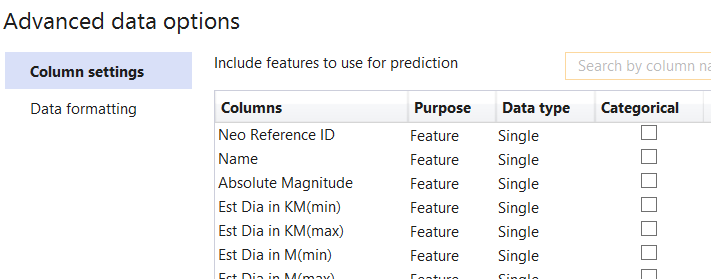
<p>The data for this post will be this <a href="https://www.kaggle.com/shrutimehta/nasa-asteroids-classification">NASA Asteroids Classification</a> dataset. We will use this to determine if an asteroid can be potentially hazardous or not. That is, if it would come close to Earth enough to be a threat.</p>

<p>Perhaps the biggest addition to the preview version is the new Model Builder config file. Let’s look at this being used in action.</p>

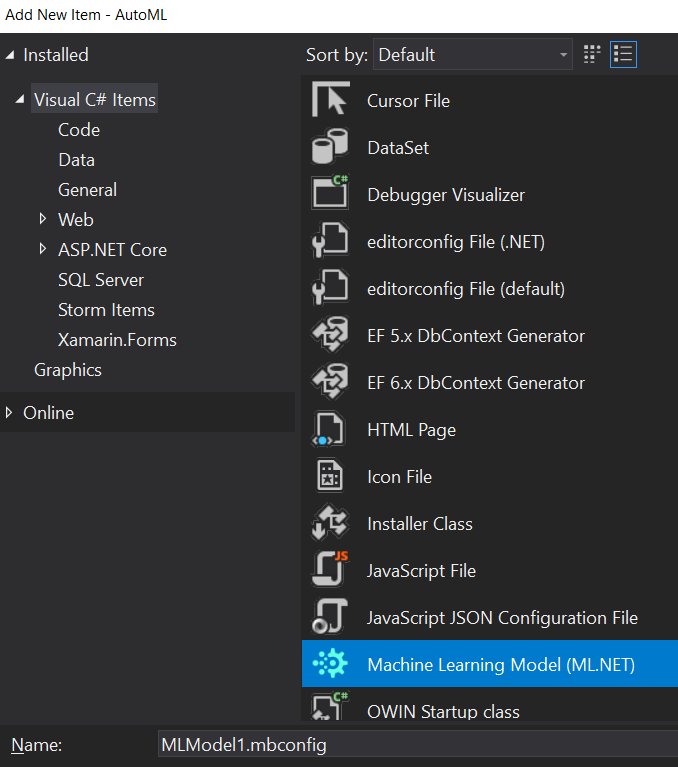
<p>Once you have the preview version installed perform the same steps as usual to bring up Model Builder by right clicking on a project and selecting Add -&gt; Machine Learning. It will now bring up a dialog for your Model Builder project.</p>

<p><img src="https://images.squarespace-cdn.com/content/v1/521545a6e4b0734032a27076/1618829542290-3XG190SK91SS8G1UEWEZ/post1-1.png?format=original" alt="" /></p>

<p>Here we can give our Model Builder project a name. We’ll name it Asteroids and click to continue. Now the regular Model Builder window shows up, but if you look at the Solution explorer there was a new file added. It was that <code class="language-plaintext highlighter-rouge">mbconfig</code> file. We will look at what’s in this file later.</p>

<p>We can use Model Builder like usual through the first couple of steps. We’ll choose the Classification scenario and will train this locally. Then, we’ll add the file and this may take a few seconds since there’s a lot of data in here.</p>

<p>Once it’s loaded we can specify the label column, which will be the “Hazardous” column at the end.</p>

<p>Let’s now explore our updated data options that we get with this preview version. To get there, select the “Advanced data options” link below where you choose where the data is located. This opens a new dialog that shows how we can update the data options. These will be auto-filled based on what Model Builder determines from the data. If you want to override them, these options are available.</p>

<blockquote>
  <p>Note that there’s a small bug in the current version for dark theme of Visual Studio. I have created <a href="https://github.com/dotnet/machinelearning-modelbuilder/issues/1410">an issue</a> to let the team know about it. For this section, I’ll use the light theme.</p>
</blockquote>

<p><img src="https://images.squarespace-cdn.com/content/v1/521545a6e4b0734032a27076/1618829555385-LE6PHMVZAGNL2VMZ7SS3/post1-2.png?format=original" alt="" /></p>

<p>The first section, after the column names, is what purpose the column is. Is it a feature or a label? If it’s neither we can select to ignore the column.</p>

<p><img src="https://images.squarespace-cdn.com/content/v1/521545a6e4b0734032a27076/1618829567589-NPRWE9LYDUAOT1315QRL/post1-3.png?format=original" alt="" /></p>

<p>The second section is what data type the column is. You can choose either a string, single (or float), or boolean.</p>

<p><img src="https://images.squarespace-cdn.com/content/v1/521545a6e4b0734032a27076/1618829590656-0Q8L0E21GQNYB9XPQA8R/post1-4.png?format=original" alt="" /></p>

<p>The last section is a checkbox to tell Model Builder if this column is a categorical feature, meaning that there are a distinct number of string entries in there. Model Builder already determined that the “Orbiting body” column is categorical.</p>

<p><img src="https://images.squarespace-cdn.com/content/v1/521545a6e4b0734032a27076/1618829604458-BCZZUAOL19PVS6R8QAMI/post1-5.png?format=original" alt="" /></p>

<p>Also, notice that we can filter out the columns with the text field on the upper right. So if I wanted to see all the columns with “orbit” in the name I can just type that in and it will filter them out for me. This is definitely helpful for datasets that have a lot of features.</p>

<p><img src="https://images.squarespace-cdn.com/content/v1/521545a6e4b0734032a27076/1618829618488-QM11YRYCK8YNQBFD81SR/post1-6.png?format=original" alt="" /></p>

<p>Compare this to what we had in the previous version. These new options give you the same thing, but they are now simpler and show more within the dialog.</p>

<p><img src="https://images.squarespace-cdn.com/content/v1/521545a6e4b0734032a27076/1618829654184-J79AFF070UDDTDNNLW16/post1-7.png?format=original" alt="" /></p>

<p>The data formatting options haven’t changed, though. That’s where you can specify if the data has a header row, what the delimiter is, or specify if the decimals in the file use a dot (.) or a comma (,).</p>

<p>Now we can train our model. I’ll set the train time to be 20 seconds and fire it off to see how it goes.</p>

<p>Our top five models actually look pretty good. The top trainer has micro and macro accuracies at around 99%!</p>

<div class="language-plaintext highlighter-rouge"><div class="highlight"><pre class="highlight"><code>|                                 Top 5 models explored                                   |
-------------------------------------------------------------------------------------------
|     Trainer                          MicroAccuracy  MacroAccuracy  Duration #Iteration  |
|11   FastForestOva                      0.9980         0.9988       1.0         11       |
|12   FastTreeOva                        0.9960         0.9882       0.9         12       |
|9    FastTreeOva                        0.9960         0.9882       0.8          9       |
|0    FastTreeOva                        0.9960         0.9882       2.0          0       |
|10   LinearSvmOva                       0.9177         0.8709       2.5         10       |
-------------------------------------------------------------------------------------------
</code></pre></div></div>

<p>Let’s now go straight to the consume step. There’s a bit more information here than the previous version.</p>

<p><img src="https://images.squarespace-cdn.com/content/v1/521545a6e4b0734032a27076/1618829681558-RXHB68NZRIMCF2MYEAJB/post1-8.png?format=original" alt="" /></p>

<p>Here they give you the option to add consuming the model as projects within your current solution. Keep a watch on this page, though, as I’m sure more options will be coming. They also give you some sample data in which you can use to help test the consumption of your model.</p>

<p>Now, let’s take a moment and look again at our <code class="language-plaintext highlighter-rouge">mbconfig</code> file. In fact, you will notice a couple of more files here.</p>

<p><img src="https://images.squarespace-cdn.com/content/v1/521545a6e4b0734032a27076/1618829697404-7KJWJQJV7STHXNJAUZJA/post1-9.png?format=original" alt="" /></p>

<p>There are now consumption and training files that we can look at. These files are similar to the training and consuming projects that would get added to your solution but you don’t have to add them as separate projects if you don’t want.</p>

<p>By the way, if for any reason, we need to close the dialog and come back to it at another time to change the data options or increase the time to run we can double click on the <code class="language-plaintext highlighter-rouge">mbconfig</code> file to bring it back. This not only brings back the Model Builder dialog, but it also retains the state of it so we don’t have to do it all over again.</p>

<p>The reason for that is, if we open the <code class="language-plaintext highlighter-rouge">mbconfig</code> file in a JSON editor, it keeps track of everything in this file.</p>

<p><img src="https://images.squarespace-cdn.com/content/v1/521545a6e4b0734032a27076/1618829711446-6MW6EBYKI3L0U55B7EW7/post1-10.png?format=original" alt="" /></p>

<p>This keeps track of everything, even the history of all of the runs within Model Builder! And, since this is a JSON file, we can keep this in version control so teams can work on this together to get the best model they can.</p>

<hr />

<p>Hopefully, this showed how much the team has done to help improve Model Builder. Definitely give feedback on their <a href="https://github.com/dotnet/machinelearning-modelbuilder/issues">GitHub issues page</a> for any issues or feature requests.</p>]]></content><author><name></name></author><category term="mlnet" /><category term="mlnet" /><category term="model-builder" /><summary type="html"><![CDATA[The ML.NET graphical tool, Model Builder, continues to get better and better for everyone to work with and, most important, for everyone to get into machine learning. Recently, there have been some really good additions to Model Builder that we will go over in this post. We will go through the entire flow for Model Builder and will highlight each of the new items.]]></summary></entry><entry><title type="html">How to Build the ML.NET Repository</title><link href="/mlnet/2021/05/03/how-to-build-the-mlnet-repository.html" rel="alternate" type="text/html" title="How to Build the ML.NET Repository" /><published>2021-05-03T00:00:00+00:00</published><updated>2021-05-03T00:00:00+00:00</updated><id>/mlnet/2021/05/03/how-to-build-the-mlnet-repository</id><content type="html" xml:base="/mlnet/2021/05/03/how-to-build-the-mlnet-repository.html"><![CDATA[<p>Have you wanted to contribute a bug fix or a new feature to the ML.NET repository? The first step is to pull down the repository from GitHub and get it built successfully so you can start making changes.</p>

<p>The ML.NET repository has great documentation. Part of it is how to build it locally from this doc. In this post, we’ll go over the steps to do this so you can do the same and get started making changes to the ML.NET repository.</p>

<p>For a video version of this post, check below.</p>

<iframe class="embedly-embed" src="//cdn.embedly.com/widgets/media.html?src=https%3A%2F%2Fwww.youtube.com%2Fembed%2FQUyZL_Tea7A%3Ffeature%3Doembed&amp;display_name=YouTube&amp;url=https%3A%2F%2Fwww.youtube.com%2Fwatch%3Fv%3DQUyZL_Tea7A&amp;image=https%3A%2F%2Fi.ytimg.com%2Fvi%2FQUyZL_Tea7A%2Fhqdefault.jpg&amp;key=61d05c9d54e8455ea7a9677c366be814&amp;type=text%2Fhtml&amp;schema=youtube" width="854" height="480" scrolling="no" title="YouTube embed" frameborder="0" allow="autoplay; fullscreen" allowfullscreen="true"></iframe>

<h1 id="fork-the-repository">Fork the Repository</h1>

<p>The first thing to do, if you haven’t already, is to fork the <a href="https://github.com/dotnet/machinelearning">ML.NET repository</a>.</p>

<p><img src="https://images.squarespace-cdn.com/content/v1/521545a6e4b0734032a27076/1619593706109-DNB75LK5H7357FM3NI97/image+%281%29.png?format=original" alt="" /></p>

<p>If you haven’t forked the repository yet, you’re good to go to the next step. However, for me, since I have already forked the repository a while back, I need to make sure I have the latest.</p>

<p>There are two ways to do sync up my fork with the main repository - running git commands or letting GitHub do it for you.</p>

<h2 id="syncing-the-fork">Syncing the Fork</h2>

<p>We can run some git commands to sync up. GitHub has <a href="https://docs.github.com/en/github/collaborating-with-issues-and-pull-requests/syncing-a-fork">good documentation</a> on how to do this for a more detailed explanation.</p>

<p>The first thing is to is to make sure you have an <code class="language-plaintext highlighter-rouge">upstream</code> remote set up to point to the main repository.</p>

<p>To check if you have it you can run the <code class="language-plaintext highlighter-rouge">git remote -v</code> command. If there is only an <code class="language-plaintext highlighter-rouge">origin</code> remote then you would need to add an <code class="language-plaintext highlighter-rouge">upstream</code> remote that points to the original repository.</p>

<p><img src="https://images.squarespace-cdn.com/content/v1/521545a6e4b0734032a27076/1619593858898-FDAMH7OD5VNHSLG6NBNF/image+%282%29.png?format=original" alt="" /></p>

<p>If you don’t have it set, this can be set with the following command.</p>

<div class="language-plaintext highlighter-rouge"><div class="highlight"><pre class="highlight"><code>git remote add upstream git@github.com:dotnet/machinelearning.git
</code></pre></div></div>

<p>Note that I have SSH set up so I use the SSH clone link. If you don’t have this set up you can use the HTTPS link instead.</p>

<p>After setting the <code class="language-plaintext highlighter-rouge">upstream</code> remote, we need to get the latest from the</p>

<div class="language-plaintext highlighter-rouge"><div class="highlight"><pre class="highlight"><code>git fetch upstream
</code></pre></div></div>

<p>Once the upstream fetched we can merge those changes into our fork. Make sure you’re in the default branch and run this command to merge in the changes.</p>

<div class="language-plaintext highlighter-rouge"><div class="highlight"><pre class="highlight"><code>git merge upstream/main
</code></pre></div></div>

<p>Now you can start working on the latest code base.</p>

<p>Note here that I attempted to use GitHub to sync my fork. Unfortunately, it seems to not do as good of a job as the git commands.</p>

<h1 id="install-dependencies">Install Dependencies</h1>

<p>Before we can start to build the code, there is a dependency we need to install. This dependency is included with a <a href="https://git-scm.com/book/en/v2/Git-Tools-Submodules">git submodule</a>.</p>

<p>If you run the build before this step you will get errors, so it’s best to do this before running the build.</p>

<p>To install the submodule dependencies, run the below command.</p>

<div class="language-plaintext highlighter-rouge"><div class="highlight"><pre class="highlight"><code>git submodule update --init
</code></pre></div></div>

<p>With the submodules installed we can now run the build through the command line.</p>

<h1 id="build-on-the-command-line">Build on the Command Line</h1>

<p>The build command is made very well in the <a href="http://ML.NET">ML.NET</a> repository so there’s very little you have to do to actually run it. We can run this on the command line. The script you run will depend on if you use Windows or Linux/Mac.</p>

<p>For Windows, you would run <code class="language-plaintext highlighter-rouge">build.cmd</code> and for Mac/Linux you would run <code class="language-plaintext highlighter-rouge">build.sh</code>.</p>

<p>The first time you run it will take a while. It needs to download several assets, such as NuGet packages and models for testing. After you download all of this, though, subsequent builds will go much faster.</p>

<h1 id="build-in-visual-studio">Build in Visual Studio</h1>

<p>With the main build now complete we can now build within Visual Studio. Although, currently, you may get an error in the <code class="language-plaintext highlighter-rouge">Microsoft.ML.Samples.GPU</code> project.</p>

<p><img src="https://images.squarespace-cdn.com/content/v1/521545a6e4b0734032a27076/1619593799577-1HFE8ZP3TG38ZFRZMW15/image+%283%29.png?format=original" alt="" /></p>

<p>Why do we get this error in Visual Studio and not when we ran the build on the command line? It turns out that Visual Studio was set to have compile errors on warnings. There are a couple of things you can do to fix this.</p>

<p>First, since this is a samples project, the simplest thing is to just comment out the method. Instead of doing that, though, we can update the build properties of the project. We can either set the “treat warnings as errors” to “None”.</p>

<p><img src="https://images.squarespace-cdn.com/content/v1/521545a6e4b0734032a27076/1619593889820-26XYJT3JN2Q10FHWMEW3/image+%284%29.png?format=original" alt="" /></p>

<p>Or, we can update the “Suppress warnings” to specify this specific warning. To get the warning we can go back and highlight the error with our cursor which will bring up a tooltip describing the error. It has a link to the <a href="https://docs.microsoft.com/en-us/dotnet/csharp/language-reference/compiler-messages/cs0618?f1url=%3FappId%3Droslyn%26k%3Dk\(CS0618\)">CS0618</a> warning. We can put in the number in the “suppress warnings” section, 0618, and save the project.</p>

<p><img src="https://images.squarespace-cdn.com/content/v1/521545a6e4b0734032a27076/1619593913620-MJB70DVEIZSC53BIGG8U/image+%285%29.png?format=original" alt="" /></p>

<p>Now we can fully build the solution in Visual Studio. Although, take note about this change when committing any other changes. You can either not include this change or include it and make a comment to discuss with the <a href="http://ML.NET">ML.NET</a> team about it.</p>

<hr />

<p>Hopefully, this post helps you get started to contribute to the <a href="http://ML.NET">ML.NET</a> repository. If you make a contribution to the <a href="http://ML.NET">ML.NET</a> repository, please let me know and we can celebrate!</p>

<iframe src="https://giphy.com/embed/Zw3oBUuOlDJ3W" width="480" height="446" frameborder="0" class="giphy-embed" allowfullscreen=""></iframe>]]></content><author><name></name></author><category term="mlnet" /><category term="mlnet" /><summary type="html"><![CDATA[Have you wanted to contribute a bug fix or a new feature to the ML.NET repository? The first step is to pull down the repository from GitHub and get it built successfully so you can start making changes.]]></summary></entry><entry><title type="html">About</title><link href="/2021/04/18/about.html" rel="alternate" type="text/html" title="About" /><published>2021-04-18T00:00:00+00:00</published><updated>2021-04-18T00:00:00+00:00</updated><id>/2021/04/18/about</id><content type="html" xml:base="/2021/04/18/about.html"><![CDATA[<p>Just a regular developer in North Carolina trying to learn as much as I can and, in turn, to use this site to help share those things with everyone else.</p>

<p>I’ve tackled on many different technologies and areas of programming. I’ve started out as a .NET web developer to work my way to using more modern web technologies such as Angular and React. I’m currently pivoting into the world of data science where I’m learning about Python, statistics, machine learning, and data analysis.</p>

<p>I do my best to teach what I know here and on my <a href="https://www.youtube.com/channel/UCrDke-1ToEZOAPDfrPGNdQw">YouTube channel</a>.</p>

<p>Feel free to use the <a href="https://dotnetmeditations.com/contact/">Contact form</a> for any questions you may have when going through this site.</p>]]></content><author><name></name></author><summary type="html"><![CDATA[Just a regular developer in North Carolina trying to learn as much as I can and, in turn, to use this site to help share those things with everyone else.]]></summary></entry></feed>